
Archive for May, 2008
Play full out and let the numbers speak for themselves
 Do you sometimes feel like you’re achieving more, doing more than your colleagues at work? In life? You’re pulling your own weight and some of the weight of others you work with, and you all get to share the credit.
Is it fair when someone else falls behind and isn’t pulling their own weight, but your successes cover their mistakes and unproductive tendencies?
What do you do about it?
Grumble and keep it to yourself? Yell at random cars in traffic to vent on the way home? Do nothing and let it build up inside?
As Phil Gerbyshak puts it in his article “You are Your Only Competition“:
“Often, as soon as they see they seem to be producing more than another person, they slow down and let everyone catch them.”
So what do you do? You DO SOMETHING about it! Play full out!
I’ve been doing this for years and someone else finally gets it and captured it almost perfectly in Phil’s article. This isn’t a new phenomenon, this happens quite a bit in many circles.
Phil goes on to say:
“You are your only competition. If you’re worried about how much Sally is doing every day, how much Fred is doing every day, why Tina gets to do x and Jimmy gets to do y, STOP RIGHT NOW.
Start by thinking about doing YOUR personal best, every single day. Play full out for a month. If you really are head and shoulders better than your competition (if you’re reading this newsletter, you’ve already shown you’re smarter than the rest of your team), play full out for a month and really set yourself apart from your peers. See what your personal best can be. Ultimately that’s what you’re getting paid to do, is to improve YOUR best numbers, every year, every month, every week, every day.”
Anyone who has worked near me, alongside me or with me knows how I work. I’ve always played full out. I go 300 miles-per-hour on everything I do. I learn fast and move faster. I’ve been told I do the job of 2-3 or more people when I’m in the zone.
That’s a compliment and a detriment because once I fall back to doing the job of 1 person… me… I’m seen as being slow or unproductive. So I just reset myself and look at it in the context of competing to beat my own personal best.
When you’re out there running on the weekend, running alone… just you, your stamina, your endurance and your heart rate monitor. What else do you have to compete with?
You want to finish your run 1 minute earlier than yesterday, and then beat it again tomorrow. You’re not fighting all of the imaginary runners alongside you, you’re fighting yourself. The same applies to most sports, business activities, social activities and so on.
Phil closes with a similar last note in his article “You are Your Only Competition”
“You are your only competition, so start acting like it. Make today a better day, a greater day, by competing with you, and only you.”
Look at your life every day. Are you doing better than you did yesterday? If not, why not?
Start each new day with that in mind, and you’ll see everything begin changing for the better in dramatic new ways.
Fix for incompatible /usr/lib/gcc/x86_64-linux-gnu/4.2.3/libstdc++.so error message
Tags: GCC, linuxI was recently building a copy of Ice 3.0.1 from ZeroC on x86_64 and ran into the following error message fairly early on:
/usr/bin/ld: skipping incompatible /usr/lib/gcc/x86_64-linux-gnu/4.2.3/libstdc++.so when searching for -lstdc++
/usr/bin/ld: skipping incompatible /usr/lib/gcc/x86_64-linux-gnu/4.2.3/libstdc++.a when searching for -lstdc++
/usr/bin/ld: skipping incompatible /usr/lib/gcc/x86_64-linux-gnu/4.2.3/libstdc++.so when searching for -lstdc++
/usr/bin/ld: skipping incompatible /usr/lib/gcc/x86_64-linux-gnu/4.2.3/libstdc++.a when searching for -lstdc++
/usr/bin/ld: cannot find -lstdc++
collect2: Error: ld returned 1 exit status
make[2]: *** [../../lib/libIceUtil.so.3.0.1] Error 1
But I clearly had libstdc++ version 5 and 6 installed:
# COLUMNS=50 dpkg -l | grep libstdc
ii  libstdc++5     1:3.3.6-15ubun The GNU Standard C++ Library v3
ii  libstdc++6     4.2.3-2ubuntu7 The GNU Standard C++ Library v3
ii  libstdc++6-4.2 4.2.3-2ubuntu7 The GNU Standard C++ Library v3 (development
This works on i386 and 32-bit Linux, so I sought out a fix, and the fix was simple; install g++-multilib:
$ sudo apt-get install g++-multilib
Reading package lists... Done
Building dependency tree
Reading state information... Done
The following extra packages will be installed:
  g++-4.2-multilib gcc-4.2-multilib lib32gomp1
Suggested packages:
  lib32stdc++6-4.2-dbg lib32mudflap0
The following NEW packages will be installed:
  g++-4.2-multilib g++-multilib gcc-4.2-multilib lib32gomp1
0 upgraded, 4 newly installed, 0 to remove and 70 not upgraded.
Need to get 1017kB of archives.
After this operation, 4854kB of additional disk space will be used.
Do you want to continue [Y/n]? y
After doing this, you may receive the following error:
/usr/bin/ld: skipping incompatible /usr/lib/gcc/x86_64-linux-gnu/4.2.3/../../../libbz2.so when searching for -lbz2
/usr/bin/ld: skipping incompatible /usr/lib/gcc/x86_64-linux-gnu/4.2.3/../../../libbz2.a when searching for -lbz2
/usr/bin/ld: skipping incompatible /usr/bin/../lib/libbz2.so when searching for -lbz2
/usr/bin/ld: skipping incompatible /usr/bin/../lib/libbz2.a when searching for -lbz2
/usr/bin/ld: skipping incompatible /usr/lib/libbz2.so when searching for -lbz2
/usr/bin/ld: skipping incompatible /usr/lib/libbz2.a when searching for -lbz2
/usr/bin/ld: cannot find -lbz2
collect2: Error: ld returned 1 exit status
make[2]: *** [../../lib/libIce.so.3.0.1] Error 1
This is due to a similar issue, and the libraries you want are in /usr/lib64/, not /usr/lib.
The fix for this is seems to be buried in Cyrillic on this thread. The fixes proposed there did not work for me, so I had to hack and slash the Make.rules.Linux file and the various Makefile targets below to get that working.
The Nightly Charging Routine
 Everything is about systems. Everything.
Packing your bag for work. Making a lunch on the weekend. Filling the dishwasher. Shopping at the grocery store. They all involve organized, structured, repetitive systems.
My daily commute to and from work has me applying quite a few of these systems on a regular basis.
Lather. Rinse. Repeat.
One of the systems I have integrated into my regular schedule is my nightly charging routine, to make sure all of my equipment is charged, topped off and ready for the next day’s plunge into questionable power availability.
Here’s the short list of things I have to make sure are fully charged and packed every day before I leave for the office.
All of these get packed every night in my NorthFace Surge pack. Kudos to Steve “Fish” Frishling for making that recommendation on a brief jaunt to NYC we shared on Amtrak (see his full review of this pack on his blog “Flying With Fish” for more detail).
Steve’s blog has lots of useful information for travelers, photographers and many other things. I highly recommend you pop over there and read a few posts to see what he’s been up to. I finally talked to someone who puts on more airline miles than Rasmus :)
Steve is several orders of magnitude ahead of me in travel miles, but we have very similar mileage for our efficiency with travel and packing.
- A Palm Treo 680 with the stock 1200mAh battery
- A 2400mAh extended battery for Treo 680 (bought from Seidio Online). I blogged about this previously. Seidio makes a 1600mAh battery that fits under the stock battery cover and provides 25% more power too, if you don’t want to replace the battery cover or have a PDA case that can’t accept the larger “bump-out” battery.
- My shiny new Jawbone II noise-canceling Bluetooth headset (see my first impressions).
- A Samsung WEP410 Bluetooth headset. This is a backup headset in case the Jawbone runs out of juice on a call or trip away from my charger.
- An APC UPB70 Universal Notebook Battery to extend the life of my laptops on the road (also charges a USB device like the Treo or headset above).
- My Canon SD750 Digital Elph portable camera for anything and everything that I might need a quick camera for while away from my “bigger rig”.
- My 80gig 5th Generation iPod
- My T61p 15.4″ “widescreen” Thinkpad
- My X61s 12″ “ultraportable” Thinkpad
- My Playstation Portable, for entertainment and diversion when I’m stuck somewhere or need to get my mind off of a problem for the moment. I mostly use it for movies and games, but it can also do music, Skype and a slew of other things.
Whew!
Without structure and a system in place, I’d forget one of the above steps and put myself in a pinch when I’d need to make use of one of those items.
It’s all about systems.
First impressions with the Aliph Jawbone II Bluetooth Headset
I’ve had a lot of bluetooth headsets in the last 8 or so years, ranging from Jabra to Motorola to Samsung, BlueAnt and others. There are always positives and negatives about each and every headset I’ve owned; more than enough to rant about here.
Now that I’m taking and making meetings while on a very busy and noisy train every day, being on mute most of the call just isn’t feasible. I needed to step up the noise cancellation to make myself more useful and more productive on these calls. I also spend a lot of time on the phone on the subway, walking in the busy streets of New York and lots of other noisy places.
I prefer having a very low-profile, small and powerful headset at my disposal, and until this Tuesday the Samsung WEP410 WAS that headset.
The Samsung WEP 410 headset looks like this:

The WEP410 is small, light and lasts forever. It also recharges in an amazingly-short amount of time. I highly recommend it for anyone who wants a powerful bluetooth headset.
I upgraded to the WEP410 headset from the much smaller (but not nearly as long-lasting), Samsung WEP200 headset.

But my headset requirements grew over time and I now need more features and function out of them, given my new environment and surroundings.
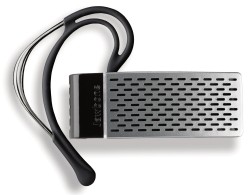
The Aliph Jawbone (version 1) was the closest contender in this space and the demos and technology itself looked very impressive. The main problem was that the “Jawbone I” headset was H-U-G-E. I can understand that it needed that space to hold the filtering electronics, but… HUGE. And heavy.
The original Jawbone headset looks like this:
I prefer not to use ear loops to hold the headset over the top of my ear, so overall weight is a factor. I’m also pretty photo-sensitive (I have 20/10 or 20/5 vision, and I don’t like a lot of light in my eyes) and wear my Oakley X-Metal Frames a good portion of the day.
Most headsets that have ear loops (Jabra, Jawbone are you listening?) don’t work at all when you wear eyeglasses or sunglasses, so I have to use a “bud” style headset, or modify an existing headset’s ear piece to accept a bud. I’ve had to do this with the last 5 headsets I’ve owned, because the supplied “bud” is nothing at all like what a human ear can accept. I don’t know what they’re molding these headset buds to fit but it most-certainly is not a human ear.
Ironically, I’m still using the 6+ year old Jabra “EarGels” that I kept from that period, to keep my new bluetooth headsets secured firmly in my ear. They look like this:
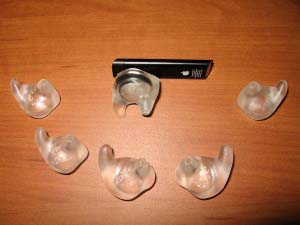
You can buy these now in packs of 6, in either clear or multicolor.
I did some searching and noticed that there was a new Jawbone version out, the Jawbone II (or Jawbone 2 as it is sometimes referred to). It promised better filtering, smaller/lighter fuselage and cost the same as the original. I decided to take the plunge and pick up one for myself.
The first thing you notice is that the packaging is absolutely stellar. It really was designed to showcase this product in every way. It is akin to a brand new concept car on a showroom floor. The plastic box, the matte-black cardboard containers inside, the directions… all of it.
The second thing you notice is that the outer surface is dimpled with a pattern that at first seems useless. It is similar to that “faux” carbon fiber look everyone is after these days. I KNOW carbon fiber. I’ve been riding a CF bike for over 8 years (complete with CF dérailleurs, handlebar, etc.), and CF has function. Fake carbon fiber does nothing but add fake aesthetics.
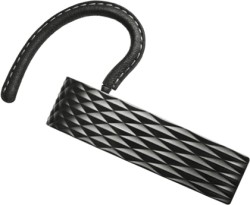
But the surface is more than just visual, it serves a purpose. When sound hits a flat surface, it tends to bounce back at an even rate. Because it’s hitting you at a level plane, you take the full audible hit. The surface of the Jawbone II (Jawbone 2) is dimpled in a way that breaks up the incoming (external) sounds and scatters them away from the headset, not directly off of it like a sounding board. Nice touch.
I tested a few calls with my head in the airflow of a very large air filter set to “High” as well as talking with my head within inches of my kitchen faucet with the water running full-blast. My unknowing “test subjects” barely realized that I could hardly hear them due to all the noise on my end, but they reported that MY side of the conversation was clear, crisp and without any significant background noise to distract or interrupt them… AT ALL!
There’s a few other really nice touches:
- The charger has a very slim wall-wart which accepts a USB male and the other end has a magnetic catch to hold the headset while charging. The wall adapter is ever so slightly larger than a box of wooden matches. No more bulky docking cradle, clip or proprietary cable required. They ship the wall wart and USB cable with the magnetic charging end. Well-done, Aliph.
- No more annoying blinking blue LED. Not only is the LED on the Jawbone II as thin as a cat’s whisker, but when you’re ON a call, it stops blinking, as it should. The LED on the Jawbone II is a simple white LED “sliver” when it is working, and a red LED when it needs to be charged (or is in pairing mode).
- Multiple choices of ear loops and sizes for the ear bud. Some headsets don’t give you a choice at all. Aliph included leather-covered ear loops as well as the simple plastic-coated wire version, in 3 different sizes for each. Again, a nice touch.
That’s good enough for me! I’ll put it to the test later this morning on the train ride into New York and see how it fares.
Now the downsides:
- There are no external buttons at all. I can understand the need to make an uncluttered interface, but you can hide the buttons so they’re not visible, without making the headset “fragile” while on a call. I was on a call tonight with the headset and was trying to reposition it in my ear (by shoving it back into my ear to hold it in place, because their ear buds were obviously molded for cow or pig ears). Pushing against the outside of the headset to put it back in my ear hung up on my call… because the ENTIRE HEADSET is a button. The whole outer skin of the headset is the hangup button. Ugh.
- No way to “bend” those ear loops without breaking them. They should be somewhat malleable so you can reposition them. In my case, I yanked them out and replaced it with a Jabra EarGels instead.
- No audible indicator when you’re “in” or “out of” filtering mode on the headset (the VSA or “Noise Assassin” mode). If you push on the headset (again, to stop it from falling off of your ear), you can inadvertently disable the filtering while you’re waiting for your next call. There’s no blink pattern or audible notification that lets me know I just disabled filtering. There’s also no way to verify that the filtering is either on or off by looking at the headset. Oops!
So far, I’m impressed… and so are my callers. They immediately noticed that my call was “crisp” and they could hear a lot more “detail” in my voice, which was a bit “muffled” and “muddy” with the last headsets I was using.
I’m going to really run this through its paces later this morning on the train into NYC, then on the subway and while standing in busy New York City traffic and sidewalk noise.
We’ll see how it fares. So far, I’m very VERY impressed.
Graphing an active SPAM attack in progress
Tags: email, firewall, hacking, linux, security, spamI woke up this morning to very slow response time on my server, and decided to check the statistics. I graph these things with a great deal of detail so I can see precisely when it happened and begin narrowing down where I need to go to fix it or report it upstream.
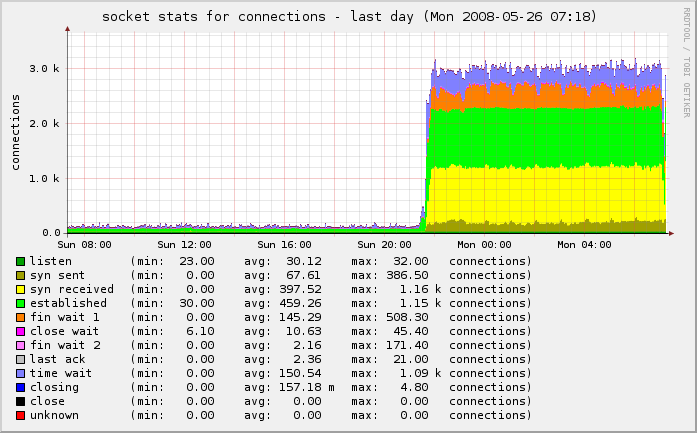
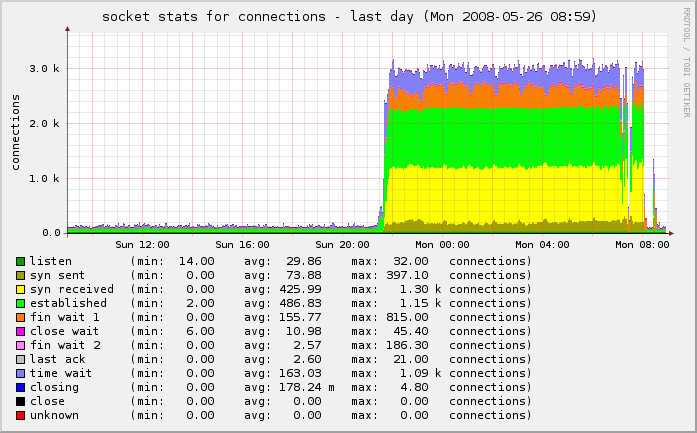
In this case, my incoming connections went from under 500/second to well over 3,000/second. Owch!
You can see the “wall” of traffic growing from our normal traffic rate to this enormously-increased rate:
I checked all of the services, logs and protocols and didn’t see anything out of the ordinary. I started shutting down services one at a time and regenerated the graphs, to see if I could see any change.
One thing I noticed was that I had poppassd open on the public port. Not a huge problem, but it was something that was unnecessary on the public interface. I locked that down with iptables:
$IPT -A INPUT -s ! 127.0.0.1 -d ! 127.0.0.1 -p tcp -m tcp --dport 106 -j DROP
But as I looked further, I noticed even more:
netstat -tulpn | grep LISTEN
This showed that I had Squid listening on the public interface as well (0.0.0.0:3128). I jumped to the squid logs and was shocked to see that they were scrolling so fast that I couldn’t even read them. Ut oh!
Apparently some enterprising young spammer found my squid instance and decided to try to hijack it for his own needs. It was already locked down internally in my squid.conf to restrict use from only my block of IPs, but he was hammering it with 8,466 separate IPs trying to use it to send spam on port 25.
# cat access.log* | cut -b20-300 | grep ':25' | perl -lne 'print /((?:\d+\.){3}\d+)/' | sort | uniq  | wc -l
8464
Damn! There goes a few gigabytes of bandwidth that were eaten in the last 11 hours while I was sleeping.
I locked that down in a similar fashion:
$IPT -A INPUT -s ! 127.0.0.1 -d ! 127.0.0.1 -p tcp -m tcp --dport 3128 -j DROP
A bit more poking around with nmap, netstat, Webmin, HotSanIC and other tools allowed me to lock down some other services that incorrectly bind to the public interface and not the internal interface.
The result is that we’re back to normal:
One last piece needed my attention. Because this was an active spam attack, propagated using the IP of my server as a vector, I had to make sure to check my mail logs and delist myself from the various RBLs who had listed me as a spammer for sending out 43,745 separate spam attempts through my IP in a matter of hours.
SpamCop originally listed me, but I corrected that, and a few others. I also reported it to my provider so they can be sure to keep a closer eye on it.
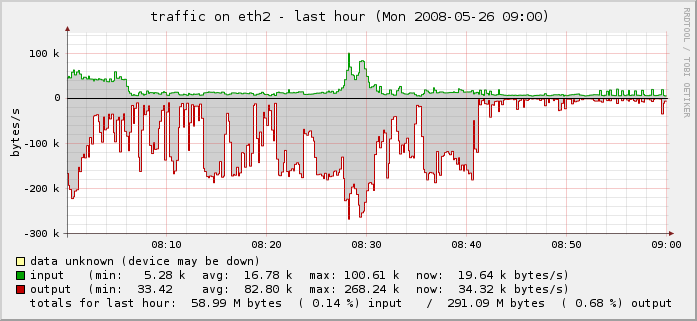
You can see the drop-off on the far right of the last two graphs above and in the traffic graph below.
Problem solved.
Validating Blog Pingback Sites with Perl
Tags: google, Perl, serversOver the last few months I’ve been wondering what the slow response time has been when I am posting new entries to my blog. Granted, the hits to my blog have more than tripled in the last 2-3 months, but my servers can handle that load. The problem was clearly elsewhere.
Some more digging and I realized that the list of 116 ping sites I have in my blog’s “Update Services” list contains quite a few pingback sites that are no longer valid.
For those new to this, a “Pingback” is a specifically-designed XML-RPC request sent from one website (A, usually a blog site) to another site (B) in response to a new entry being posted on the site.
In order for pings (not to be confused with ICMP pings) to work properly, it requires a physical link in the form of a URL to validate. When (B) receives the notification signal from (A), it automatically goes back to (A) checking for the existence of a live incoming link to (B). If that link exists, the Pingback is recorded successfully.
This “validation” process makes it much less prone to spam attacks than something like Trackbacks. If you’re interested in reading more about how spammers are using Pingbacks and Trackbacks to their advantage, I suggest reading Blog trackback Spam analysis on the “From Information to Intelligence” blog site.
But I needed a way to test all of those ping sites and exclude the ones that are dead, down or throwing invalid HTTP responses… so I turned to Perl, of course!
My list of ping sites is a sorted, uniq’d plain-text list that has one ping site per-line. The list looks something like this:
http://api.moreover.com/ping
http://bitacoras.net/ping
http://blog.goo.ne.jp/XMLRPC
http://blogoole.com/ping
http://blogsearch.google.com/ping/RPC2
http://godesigngroup.com
http://godesigngroup.com/blog/feed
http://imblogs.net/ping
http://ping.bitacoras.com
http://ping.bloggers.jp/rpc
http://ping.blo.gs
http://pinger.blogflux.com/rpc
http://pinger.onejavastreet.com/
http://ping.myblog.jp
http://pingoat.com
http://pingomatic.com
http://rcs.datashed.net/RPC2
http://rpc.blogbuzzmachine.com/RPC2
http://rpc.blogrolling.com/pinger
http://rpc.pingomatic.com
http://rpc.weblogs.com/RPC2
http://rpc.wpkeys.com
...
I pass that list into my perl script and using one of my favorite modules (File::Slurp), I read that file and process each line with the following script:
use strict;
use URI;
use File::Slurp;
use HTTP::Request;
use LWP::UserAgent;

my @ping_sites          = read_file("pings");
my @valid_ping_sites    = ();

for my $untested (@ping_sites) {
        my $url         = URI->new($untested);

        my $ua          = LWP::UserAgent->new;
        $ua->agent('blog.gnu Ping Spider, v0.1 [rss]');
        $ua->timeout(10);

        my $req         = HTTP::Request->new(HEAD=>"$untested");
        my $resp        = $ua->request($req);
        my $status_line = $resp->status_line;

        (my $status)    = $status_line =~ m/(\d+)/;

        if ($status == '200') {
                push @valid_ping_sites, "$url\n";
        } else {
                print "[$status] for $url..\n";
        }
}

my $output      = write_file("pings.valid", @valid_ping_sites);
The output is written to a file called “pings.valid“, which contains all of the sites which return a valid 200 HTTP response. The remainder are sent to STDOUT, resulting in the following output:
$ perl ./pings.pl
[403] for http://1470.net/api/ping..
[403] for http://api.feedster.com/ping..
[404] for http://bblog.com/ping.php..
[500] for http://blogbot.dk/io/xml-rpc.php..
[403] for http://blogmatcher.com/u.php..
[500] for http://blogsnow.com/ping..
[404] for http://fgiasson.com/pings/ping.php..
[404] for http://pingoat.com/goat/RPC2..
[500] for http://ping.syndic8.com/xmlrpc.php..
[500] for http://ping.weblogalot.com/rpc.php..
[403] for http://popdex.com/addsite.php..
[404] for http://www.blogdigger.com/RPC2..
[500] for http://www.blogsnow.com/ping..
[500] for http://www.blogstreet.com/xrbin/xmlrpc.cgi..
[404] for http://www.catapings.com/ping.php..
[500] for http://www.focuslook.com/ping.php..
[500] for http://www.holycowdude.com/rpc/ping..
[403] for http://www.popdex.com/addsite.php..
[500] for http://xmlrpc.blogg.de..
...
Those failed entries are then excluded from my list, which I import back into WordPress under “Settings → Writing → Update Services”.
The complete, VALID list of ping sites as of the date of this blog posting are the following 49 sites (marking 58% of the list I started with as invalid):
http://1470.net/api/ping
http://api.feedster.com/ping
http://api.moreover.com/ping
http://bblog.com/ping.php
http://bitacoras.net/ping
http://blogbot.dk/io/xml-rpc.php
http://blog.goo.ne.jp/XMLRPC
http://blogmatcher.com/u.php
http://blogoole.com/ping
http://blogsearch.google.com/ping/RPC2
http://blogsnow.com/ping
http://fgiasson.com/pings/ping.php
http://godesigngroup.com
http://godesigngroup.com/blog/feed
http://imblogs.net/ping
http://ping.bitacoras.com
http://ping.bloggers.jp/rpc
http://ping.blo.gs
http://pinger.blogflux.com/rpc
http://pinger.onejavastreet.com/
http://ping.myblog.jp
http://pingoat.com
http://pingoat.com/goat/RPC2
http://pingomatic.com
http://ping.syndic8.com/xmlrpc.php
http://ping.weblogalot.com/rpc.php
http://popdex.com/addsite.php
http://rcs.datashed.net/RPC2
http://rpc.blogbuzzmachine.com/RPC2
http://rpc.blogrolling.com/pinger
http://rpc.pingomatic.com
http://rpc.weblogs.com/RPC2
http://rpc.wpkeys.com
http://www.a2b.cc/setloc/bp.a2b
http://www.blogdigger.com/RPC2
http://www.blogsdominicanos.com/ping/
http://www.blogsnow.com/ping
http://www.blogstreet.com/xrbin/xmlrpc.cgi
http://www.catapings.com/ping.php
http://www.feedsky.com/api/RPC2
http://www.focuslook.com/ping.php
http://www.godesigngroup.com
http://www.holycowdude.com/rpc/ping
http://www.imblogs.net/ping
http://www.pingmyblog.com/
http://www.popdex.com/addsite.php
http://www.wasalive.com/ping/
http://www.xianguo.com/xmlrpc/ping.php
http://xmlrpc.blogg.de
Feel free to use this list in your own blog or pingback list.
If you have sites that aren’t on this list, add them to the comments and I’ll keep this list updated with any new ones that arrive.
Locking more of the web down behind TLS and SSL
Tags: servers This is another case of yak shaving that all started with trying to implement imapproxy to proxy internal IMAP connections between Dovecot and SquirrelMail on my public servers.
Implementing imapproxy was a simple drop-in. All that was required was some server-side configuration to get Dovecot to listen to the server port that imapproxy uses, and then get imapproxy to listen on the public (external) port for clients to connect to.
In my /etc/dovecot/dovecot.conf, I set up the following:
protocols = imap imaps
protocol imap {
        listen = 127.0.0.1:14300
        ssl_listen = *:993
}
...
ssl_cert_file = /etc/ssl/certs/dovecot-ssl.crt
ssl_key_file = /etc/ssl/private/dovecot-ssl.key
In /etc/imapproxy.conf, I configured it as follows:
server_hostname 127.0.0.1
listen_port 143
listen_address 127.0.0.1
server_port 14300
...
tls_cert_file /etc/ssl/certs/dovecot-ssl.crt
tls_key_file /etc/ssl/private/dovecot-ssl.key
Restarting both, and now IMAP connections are proxied and kept open for the duration of the session. It is visibly faster now when interacting with IMAP over that connection.
For SquirrelMail, I had to tweak accordingly as well to listen on port 14300 on host 127.0.0.1. Under SquirrelMail’s config (Option 2 → A → 5 under the configure script), I changed the port to 14300. That now gets SquirrelMail talking to imapproxy, speeding up webmail by several orders of magnitude.
But it was still in the clear. Unfortuntely, there’s no easy way to just plug SquirrelMail into IMAP over SSL… so I had to use stunnel to do that:
/usr/bin/stunnel -P/var/run/ -c -d 1430 -r 127.0.0.1:993
Now I went back into SquirrelMail’s config and changed the port to 1430 from 14300. Now SquirrelMail is talking to the local imapproxy → Dovecot over SSL instead of plain text.
But now my Dovecot certs needed to be regenerated because they were close to expiring, and with the recent Debian PRNG problem, it was better to just re-gen all certs and keys anyway.
To do that, I had to do the following:
$ openssl genrsa -out dovecot-ssl.key 4096

$ openssl req -new -key dovecot-ssl.key -out dovecot-ssl.csr
I pasted the contents of that final CSR (dovecot-ssl.csr above) into the form at CACert and had them generate a new server certificate for my mail host: mail.gnu-designs.com, where my Dovecot instance resides. With that, I put those keys in their proper location and configured /etc/dovecot/dovecot.conf accordingly:
ssl_cert_file = /etc/ssl/certs/dovecot-ssl.crt
ssl_key_file = /etc/ssl/private/dovecot-ssl.key
Restarted Dovecot and now I’m properly secured with stronger, less vulnerable keys and certs.
But what about locking down SquirrelMail behind SSL as well?
To do that, I had to update my DNS to point mail.gnu-designs.com to a separate physical IP on the same machine. With Apache, you can’t have more than one SSL VirtualHost behind the same physical IP. Each new SSL host you want to deploy has to be on its own physical IP address.
So I had to change my DNS to point mail.gnu-designs.com from its present IP to a new IP on the same host. Now comes the tricky part… configuring Apache.
Since I run Debian, the Apache configuration is a bit… non-standard. In /etc/apache2/ports.conf, I had to change the Listen directive to listen on port 443 of that new IP.
Listen 72.36.135.43:443
Listen 72.36.135.43:80
And a VirtualHost stanza for that new SSL vhost had to be created..
Now my regular non-SSL stanza can be changed to look like this:
<VirtualHost *:80>
        ServerName mail.gnu-designs.com
        Redirect permanent / https://mail.gnu-designs.com/
</VirtualHost>
This will redirect non-SSL clients to the SSL version of the site, so their session is secured behind SSL on port 443. One last poke to make it possible to use the SSL VirtualHosts without having to import the upstream Root CA Certificate:
SSLCACertificateFile ssl.certificates/cacert-root.crt
From the Apache 2.x documentation:
This directive sets the all-in-one file where you can assemble the Certificates of Certification Authorities (CA) whose clients you deal with. These are used for Client Authentication. Such a file is simply the concatenation of the various PEM-encoded Certificate files, in order of preference.
I duplicated the same process for my other SSL vhost; spam.gnu-designs.com, for the DSPAM web interface.
If you’re not using dspam to reduce your spam by 99.9%, you should be. It runs circles around every OSS and commercial product I’ve tried, and I’ve been running it for years (see my previous posts on dspam for more background and hard data).
Conclusion:
I did a few things here:
- Set up an IMAP proxy in front of Dovecot, my IMAP server which dramatically increased the responsiveness of the IMAP server
- Configured that proxy to speak SSL (imaps on port 993) as well as plain imap (port 143)
- Configured SquirrelMail to talk to the IMAP proxy over SSL only, using stunnel
- Locked down two of my public-facing Apache vhosts with SSL (webmail and dspam)
- Regenerated all SSL certificates and keys with stronger encryption using CACert
- Imported the CACert root certificate and made it global within all of my Apache SSL vhosts
Now everything is a bit more secure than it was before… for now.
Last note: As I was writing this post, I realized that WordPress was eating some characters in my
<code> … </code> blocks. I looked around for a plugin to try to alleviate that, and found several, none of which worked properly.
I tried Code Auto-Escape which at first glance looked promising, but all it did was encode my code blocks into a single-line base64 string, and output that. Blech.
Then I tried one called Code Markup which had a very detailed explanation and several ways to use it. It too failed miserably on the most basic of code blocks (the Apache stanzas above).
It referenced several other markup and syntax highlighting plugins (geshi, highlighting with Enscript, etc.), none of these worked as advertised either.
What I finally found that DID work, was a a Java-based tool called Code Format Helper for WordPress. Basically you paste your code block into the small java applet, and it converts all of the entities to encoded entities. You then paste that into your WordPress post and submit that. You can see in the above post that it works perfectly.
Voila!
Putting an END to WordPress Trackback, Comment and Registration Spam
Tags: Perl
I run quite a few WordPress blog sites for myself (you’re reading it), my company and for users who wish to have their own blog on the web.
I keep all of these up-to-date with all of the latest versions of WordPress, the latest plugins and any security fixes or updates. Here are a few examples of blog sites I’ve created with WordPress, using some automated tools I’ve written (in Perl of course):
Diabetes Information Resources
Articles, news, reviews and information for the diabetic or caregivers
Acne Treatment Resources and Living With Acne
Acne treatment, support and skin research for teens and adults
Cancer Treatment Information and Resources
A place for cancer patients and caregivers to go for support
(the latter one needs a better theme, I’ll work on that later)
I have already implemented reCAPTCHA for WordPress, Akismet and Bad Behavior. All three of them work very well together without any issues that I’ve seen.
Akismet takes a collaborative approach to combating spam-like comments in your blog. Any comments which contain a high likelihood of being spam are flagged by Akismet and set aside in the quarantine. You can them go back into there and approve/purge those comments as you see fit. According to this blog’s statistics, Akismet has protected my blog from 17,124 spam comments already.
reCAPTCHA helps prevent automated abuse of your site (such as comment spam or bogus registrations) by using a CAPTCHA to ensure that only humans perform certain actions.
reCAPTCHA is very interesting because it actually benefits the community as a whole. When you enter the words presented, you’re actually helping to digitize printed books, by translating words that were OCRd using software to scan actual printed pages, into digital text, to make meaningful sense out of the scanned items.
OCR isn’t a perfect technology and sometimes it makes mistakes. A blurry ‘e’ might be mistaken for a lowercase ‘s’ for example. Human eyes can discern the difference, and this is what reCAPTCHA does. If you want to learn more, you can read more detail about reCAPTCHA on their website.
But this isn’t enough. Spammers are getting smarter and the volume of spammers is increasing at exponential rates.
The nature of Open Source actually hurts us here, because the same tools we use to prevent and block spam, can be downloaded by the spammers, analyzed and their scripts can be modified to circumvent any of the blocking we attempt. These spammers can download the source for Akismet or reCAPTCHA or WordPress and find holes in it to exploit. And that is exactly what they’re doing.
But that only stops people who are using comment forms and are trying to post comments. What about trackback and registration spam?
First, what are these? How are spammers using these to abuse your system or blog?
Trackback Spam (TrackBack plugins at WordPress)
Trackback spam is a technique where individuals or companies abuse the TrackBack feature of a blog to insert spam links on some blogs. Allowing trackbacks allows spammers to actually add content to your pages (in the form of comments).
If you allow trackbacks on your blog, these links will appear on your blog, and direct spiders and other traffic FROM your popular blog site TO their spam or phishing site. Trackbacks do have a positive use, so you can enable them… if you take precautions to protect them accordingly.
One way to do this with WordPress is to rename wp-trackback.php to something else that these spammer’s automated scripts will not be able to “guess”.
You’ll also have to change the reference to wp-trackback.php in the following two files:
wp-includes/template-loader.php
wp-includes/comment-template.php
Most of the automated trackback spam tools will just hit several thousand websites at a time by attempting to send a POST request to wp-trackback.php directly. If you rename it, they won’t find that file on your server, and will get a 404 error. If someone uses the proper comment form on your website, they’ll get the right version of your renamed file.
The other option is to just disable trackbacks altogether. You can find this under Settings → Discussion. Simply uncheck “Allow link notifications from other blogs (pingbacks and trackbacks.)” This can also be accomplished within each post by unchecking the “Allow pings” checkbox when you compose or edit your posts.
Another option is to use a plugin to try to thwart or validate trackbacks. I use one called Simple Trackback Validation. It was a simple drop-in plugin, and appears to work very well.
When a trackback is received on your blog, Simple Trackback Validation will:
- Check to see if the IP of the trackback sender is the same as the IP address of the source the trackback URL is referring to.
This reveals almost every spam trackback (more than 99%) since spammers do use automated bots which are not running on the machine.
- Retrieve the web page at the URL included in the trackback. If the webpage doesn’t a link to your blog, the trackback is considered to be spam. Since most trackback spammers do not set up custom web pages linking to the blogs they attack, this simple test will quickly reveal illegitimate trackbacks.
Also, bloggers can be stopped abusing trackback by sending trackbacks with their blog software or webservices without having a link to the post.
The combination of these three techniques will stop almost every fake, false or fraudulent trackback your blog may receive.
Registration Spam (Registration plugins at WordPress)
The last one is the most challenging, and very-recently, the most abused; Registration Spam.
Registration spam is relatively new, but it allows someone to “bomb” your blog with thousands of fake usernames and registration requests, which your system will then dutifully attempt to send out a confirmation email to the address specified.. which in most cases will be fake, causing your machine to receive a bounce message in return.
Spammers are using GMail and Yahoo addresses to do this right now, so you might see hundreds or thousands of new users attempting to sign up for your blog every week, all of them fake.
I searched around for awhile to try to figure out what tools or plugins I could use to try to stop this. I found something called WP-Ban, but it doesn’t actually seem to work at all.
WP-Ban claims to ban users by IP, IP Range, host name and referer url from visiting your WordPress’s blog. It will display a custom ban message when the banned IP, IP range, host name or referer url tries to visit you blog. You can also exclude certain IPs from being banned.
In my experience with it, it does not work at all.
I looked for something that would make adding a “plain text” name to the signup field a mandatory item. This means that instead of jdoe@gmail.com being signed up, they would have to also enter “John Doe” in the Name field of the signup form. I found nothing that did this for me.
But I did stumble on something called ‘CapCC’ in my travels that HAS helped. CapCC is a small captcha plugin that works with either comments, registration or both. Since I already used reCAPTCHA and it was having a positive effect, I decided to use CapCC for just user registrations. Now the incoming users have to enter a small 5-character string before their registration can be processed.
As a result of this, I now allow anonymous people to post comments (moderated, of course). I don’t have to worry about fake users trying to join, abuses of my MTA or other garbage.
Hopefully others will find this useful.
What are you here for in this world? (Part 1)
“Giving back is how you define success in this life.”
-Anonymous
And another:
“The true measure of a man is how you handle victory… and defeat.”
Something to think about.
This is related to a very deep conversation I had recently on the train with a car full of people about life, love, the spirit, the soul and what it means to be “alive”.
At the end of the night one woman who was off in the corner asked me if I was a philosophy professor. I said no, and she said I should be. Maybe I should. I’ve always considered going to school for Philosophy, or Forensics or Law. I have many years left… so maybe I’ll plan for that in the coming years.
Back on-topic though… what is the real point of your life on this orbiting rock around that molten globe we call the Sun? How would you define your life as “complete” in this world?
When can you say to yourself: “I’ve done the best I can do in this world. I’m ready to go now.”?
A good friend of mine is facing the potential loss of her grandmother; a woman who has lived a full live of 106 years in this world; over a century of life. She has seen children, dozens of grandchildren, at least 3 wars, lived through the depression and many, many other things.
I asked the people gathering in the train car about what they want to do in this world to be remembered by others. One person sitting one table over said he wants to make millions of dollars, so people know who he is and remember him. He wanted to be a millionaire.
I asked him to name the top 3 millionaires. He couldn’t name any. I asked him to name at least 2 billionaires. He didn’t have any. One person at the table behind me spoke up with “BILL GATES!”
I turned around and said “Good, that’s one. Name one more…” He didn’t have a second one (Warren Buffet, Larry Ellison would be my top guesses here).
So I told the first person:
“How are people going to remember you as a millionaire, if you yourself can’t even remember any famous millionaires or billionaires?”
Then he said he would give his money to his family to help them, and they’d remember him that way. Ok, that’s great and I definitely respect that, and that would certainly keep him in their memories for awhile.
But what if he took those millions, gave some to your family and invested the rest for a few years to help solve the drought problem in Africa? Or create a new life for millions of ravaged people in Darfur? Or invested the money to help convert his entire town or city to “green” power solutions? Or do whatever you think will change the world, change enough people, to make you immortal.
(hold on, there is a point to all of this)
The conversation dove down into the deep philosophical topic about using a “Star Trek” transporter for travel instead of trains and airplanes (most said they would definitely use a transporter, until I explained further… clashing directly with their religious and moral beliefs, and almost everyone eventually changed their tune afterwards, saying they would never use a transporter).
We talked about about where the “soul” is located, what makes someone “better” than someone else, and many other topics. Lots of people searched deep within themselves on that trip, and certainly learned and shared a lot. It was probably the single deepest conversation I had with such a large group of people at one time.
But the one thought I left everyone with on that commute was that all we are, all we EVER are in this world… is what we leave behind. What we leave behind is not a full bank account, not a parking lot full of sports cars we’ve collected and restored and not a huge group of friends we hung out with in our life.
What we leave behind are our creations, things we build, and memories in people we’ve shared this world with; memories of people we’ve affected in this world. People who will talk about us long after we’re gone.
Are we immortal?
Not physically, no (not yet anyway, but that brings its own population density issues). We CAN live on in the memories of people who carry our life with them. We live on in the lips and conversations of our relatives, our children, our friends and our family.
We give birth to our children, mold them and teach them lessons and skills they will remember throughout their entire lives. They keep us alive. Our children grow into our big shoes and take our genetic material and share that with others, and create children and generations and lessons of their own.
What are YOU here for in this world? Do you know? Do you even think about that?
Are you doing ALL you can do, all you SHOULD do, to make your life in this world worth talking about?
Are you doing what you need to do in this world to be “immortal”?
If you could do anything in this world, what would you do? Are you doing that right now? Why not?
One thing that will stick with me forever, was passed to me from my high-school guidance counselor:
“Do what you like, and like what you do. Nothing else matters.”
Think about everything you do, every SINGLE THING you do and put it in that context.
And smile.
Always keep a smile on your face. If you’re not happy in this world, do whatever you need to do to put that smile back on your face.
What the hell is wrong with the human race?
(I’m typing this as I commute on the morning train)
Moments ago, a commuter on the Amtrak train I take every morning got up to get off the train at his/her stop in New Haven, walked by my table in the cafe car and knocked the open juice bottle that was on my table over, splashing it all over everything; my paperwork, my phone, my laptop, my train ticket, my journal… everything. It splashed up and onto the front of my white dress shirt too, staining it with a nice dark ‘tea’ color.
The bottle was at least a foot inboard of my table, there’s no reason they should have hit it, unless they were swinging their bag around like a gymnast.
This “person” (and I use that term loosely here) stood the bottle up, looked at me while the juice pooled all over my table and soaked into all of my paperwork, and continued to walk off the train. Not a word was said, not even “Oh my, I’m so sorry!”
So I’m here blotting my shirt, soaking up the juice on my table, my laptop, my journal, and trying to dry my paperwork with towels, as the cafe attendant Michael looks on shaking his head in disgust at the person who just walked off the train after causing this.
People boarding the train at the same time saw it, saw the person walk off, and asked me if they even apologized. I said “No, they didn’t.”. Obviously SOME people know the right way to behave. Why don’t others?
What the hell is wrong with people?
Are we really that broken as a species, as a race, that we can’t even apologize for doing something so stupid to someone else? Are our social skills really that de-evolved that we don’t even know what it means to treat our fellow man with respect and dignity?
Disgusting.