Submitting Tasks to Tracks via Email

Tags: , , ,

I’ve recently installed Tracks on my server to help me manage my myriad of tasks, projects and timelines utilizing the GTD methodology created by David Allen.

After installing it on my server I almost immediately noticed that Ruby and Rails was going to have a problem coexisting with my very tweaked Apache instances (running roughly 300 separate websites).

I found a project called Passenger, and immediately got that working with Tracks running on top of it. No fuss, no muss.

But one problem with Tracks that I’ve found (well, one of several, none of them showstoppers), is that you can’t interact with Tracks any other way other than the web interface. The interface is nice and clean and slick, but I don’t always have access to the web where I am.. and that limits the functionality of Tracks for me. I do, however… have access to some sort of email account everywhere I go.

So I whipped up a quick little script to allow me to send email to Tracks and have it post Tasks in the right contexts and on the right due dates for me.

Here’s the code for that:

#!/usr/bin/perl
#        _._   
#       /_ _`.      (c) 2008, David A. Desrosiers
#       (.(.)|      setuid at gmail.com
#       |\_/'|   
#       )____`\     Email to Tracks interface
#      //_V _\ \ 
#     ((  |  `(_)   If you find this useful, please drop me 
#    / \> '   / \   an email, or send me bug reports if you find
#    \  \.__./  /   problems with it. I accept PayPal too! =-)
#     `-'    `-' 
#
##############################################################################
# 
# License
#
##############################################################################
#
# This script is free software; you can redistribute it and/or modify it
# under the terms of the GNU General Public License as published by the Free
# Software Foundation; either version 2 of the License, or (at your option)
# any later version.
# 
# This script is distributed in the hope that it will be useful, but WITHOUT
# ANY WARRANTY; without even the implied warranty of MERCHANTABILITY or
# FITNESS FOR A PARTICULAR PURPOSE.  See the GNU General Public License for
# more details.
# 
# You should have received a copy of the GNU General Public License along
# with this program; if not, write to the Free Software Foundation, Inc., 59
# Temple Place
#
# - Suite 330, Boston, MA 02111-1307, USA.
#
##############################################################################
# 
# Email format can be any of the following:
#
#       Subject: The main description of the Task
#
#       @Context
#       01/02/2003
#       This is my note text
#
# or:
# 
#       Subject: Default Task description
#
#       c: @context
#       d: 2008/12/31
#       n: The note text to insert
#
# Most valid date formats are accepted, and this will do its best to
# "correct" and normalize them. You can also prefix your lines with the
# modifiers above, or read the regexes below for more. For example: 
# c:, context:, cxt:, con:, ct: are all valid prefixes for "context"
# n: and note: are all valid prefixes for "notes", and so on.
#
##############################################################################
use strict;
use XML::Simple;
use LWP::UserAgent;
use URI::Escape;
use Email::Abstract;
use Date::Manip;
use Date::Parse;
use Data::Dumper; 

my $url                 = "http://your.tracks.site/todos.xml";
my $contextUrl          = "http://your.tracks.site/contexts.xml";

# The default contextid where you want the todo added
# SELECT id,name FROM contexts;
my $contextid           = "8";

my $user                = "yourname";
my $password            = "yourpass";

# Leave these tokens alone.  They are valid as of Tracks 1.5 RESTful API.
my %todo = map { +($_ => "todo[$_]") } qw(notes context_id description due);

# Get the context legend in order to match by name
my $ua                  = new LWP::UserAgent;
my $req                 = new HTTP::Request 'GET',$contextUrl;
$req->authorization_basic($user,$password);
my $res                 = $ua->request($req);
my $contexts            = XMLin($res->content);

# Split apart the email into Subject and Body
my $message             = do { local $/; <STDIN> };
my $email               = Email::Abstract->new($message);
my $subject             = $email->get_header("Subject");
my $body                = $email->get_body;

# These can probably be cleaned up a bit
my ($context_line)      = $body =~ /^(?:c:|ct:|cxt:|con:|context:|@)\s*(.+)$/mi;
my ($date_line)         = $body =~ /^(?:d:|date:)\s*(\d.*)$/m;
$date_line              = UnixDate(ParseDate("today"), "%g") if (length($date_line) == 0);
my $time                = str2time($date_line);
my $due_date            = UnixDate(scalar gmtime($time), "%m/%d/%Y");
my ($note_line)         = $body =~ /^(?:n:|note:)\s*(.*?)$/mi; 

# Concatenate the data here before we send POST to the Tracks server
my $post_data = 
        $todo{'context_id'} . "=" . $contextid . "&" . 
        $todo{'description'}. "=" . uri_escape($subject) . "&" . 
        $todo{'notes'} . "=" . uri_escape($note_line) . "&" . 
        $todo{'due'} . "=" . uri_escape($due_date);

# Use LWP to do the posting ($ua was created earlier)
$req = new HTTP::Request 'POST',$url;
$req->content_type('application/x-www-form-urlencoded');
$req->content($post_data);
$req->authorization_basic($user,$password);
$res = $ua->request($req);

You can send emails in the format in the comments above to your Tracks install and it will create Tasks for you. I could refactor those regexes a bit, and that’s a task on my list, but so far, this works…

Emails look like this:

Subject: Update regexes in Tracks perl email interface
From: "David A. Desrosiers" <desrod at gnu-designs.com>
To: 2e59561d76 at gnu-designs.com
Content-Type: text/plain
Message-Id: <1228182961.14783.123.camel at gnu-designs.com>
Mime-Version: 1.0
X-Mailer: Evolution 2.22.3.1 
Content-Transfer-Encoding: 7bit
Date: Mon, 01 Dec 2008 20:56:02 -0500
X-Evolution-Format: text/plain

c: @Internet
d: 12/15/2008
n: Clean up the regexes that processes email-based Tracks tasks

Set it up in your MTA as an alias, as follows:

2e59561d76:                         "|/path/to/tracks-mail.pl"

Make sure you re-run newaliases(1) after adding this entry:

$ sudo /usr/sbin/newaliases
/etc/mail/aliases: 248 aliases, longest 82 bytes, 15141 bytes total

I tried to make it smart enough to figure out most common (valid please) date formats and if you omit that, it just sets it to today’s date so you can change it later.

The next step is to figure out how to make this script multi-user aware, without forcing users to expose their username or password in email directly. I have some ideas for that and will test that in v1.1 of this script and release it later on.

The Tracks Forums are pretty busy and lots of people are beating up the code, testing it in many different ways. I’m just trying to contribute back in whatever way I can.. in the hopes that the project continues to thrive and grow.

If you have any suggestions or ideas, let me know!

Querying the health of your domain and DNS

Tags:

I run a lot of domains for clients, Open Source projects and my own pet projects… and keeping them all registered, updated and proper zone files for forward and reverse DNS can be complicated. I run my own DNS, and would never trust a third-party to do it again. I used to use a third-party to manage my DNS, but their web-based system was clunky and wasn’t as fast as I needed it to be.

But checking the quality of your DNS records is another matter entirely. For example, there’s a huge difference between writing HTML, and writing valid HTML. This is why HTML validation exists.

Likewise, there is also a need for “DNS validation”. Enter DNS health and checking tools.

Previously, I used a free service called “DNS Report” from DNS Stuff, and it worked great… but decided to go non-free, and requires subscription to get to the same report data that they used to provide gratis. Seems that whenever someone feels they can charge for something, they do.

I’ve been seeking out another alternative, something free and full-featured. There are quite a few, and some are shady… but here’s the list I’ve found, along with my personal review of their “quality”:

CheckDNS

http://www.checkdns.net/

This is a no-frills DNS checking service. It basically gives you a quick rundown of your domain through the root servers, your local nameservers, the version correlation (making sure the serial in your zone file matches), your webserver and your mail server.

Pros: It just works, plain-jane simple. I wish it had more detail like the ability to check reverse DNS, traceroute, check route status, rate the speed to resolve DNS queries and so on.

Cons: No suggestions for resolving anything marked as an issue or conflict. If you know DNS inside and out, the errors are obvious, but if you don’t… it can be cryptic. For example, my mailserver is greylisting all incoming connections, so it will return a 421 response instead of the expected 250 response. Their incoming probe looks like the following to my DNS server:

Nov 30 15:53:15 neptune sm-mta[11904]: mAUKrEPP011904: Milter: from=, reject=421 4.3.2 graylisted - please try again later

intoDNS

http://www.intodns.com/

Pros: Simple and fast. The results it returns are very similar and almost identical to the ones provided by DNSReport. Here is one example against one of my most heavily-hit domains; plkr.org.

Cons: No real details on how to fix the issues it reports. It may report that your SOA refresh is not correct, but lacks any recommendations on how to fix it (i.e. increase/decrease the timeout, etc.)

ZoneCheck

http://www.zonecheck.fr/

Pros: Fast, clean and tests a lot of various bits about your DNS: SOA, coherence, serial, illegal characters, ip-to-ns matching and so on. Very thorough.

Cons: While it is powerful, the resulting report isn’t exactly the most user-friendly, and the initial interface is… well, clunky as well.

Here’s a sample of the output from one of my domains:

     Testing: misused '@' characters in SOA contact name (IP=72.36.135.42)
     Testing: illegal characters in SOA contact name (IP=72.36.135.42)
     Testing: serial number of the form YYYYMMDDnn (IP=72.36.135.42)
     Testing: SOA 'expire' between 1W and 6W (IP=72.36.135.42)
     Testing: SOA 'minimum' between 3M and 1W (IP=72.36.135.42)
     Testing: SOA 'refresh' between 1H and 2D (IP=72.36.135.42)
     Testing: SOA 'retry' between 15M and 1D (IP=72.36.135.42)
     Testing: SOA 'retry' lower than 'refresh' (IP=72.36.135.42)
     Testing: SOA 'expire' at least 7 times 'refresh' (IP=72.36.135.42)
     Testing: SOA master is not an alias (IP=72.36.135.42)
     Testing: behaviour against AAAA query (IP=67.126.192.9)
     Testing: coherence between SOA and ANY records (IP=72.36.135.42)
     Testing: SOA record present (IP=67.126.192.9)
     Testing: SOA authoritative answer (IP=67.126.192.9)
     Testing: coherence of serial number with primary nameserver (IP=72.36.135.42)
     Testing: coherence of administrative contact with primary nameserver (IP=72.36.135.42)
     Testing: coherence of master with primary nameserver (IP=72.36.135.42)
     Testing: coherence of SOA with primary nameserver (IP=72.36.135.42)
     Testing: NS record present (IP=72.36.135.42)
     Testing: NS authoritative answer (IP=72.36.135.42)
     Testing: given primary nameserver is primary (IP=67.126.192.9)

And the results from that:

Test results
  ---- warning ----
   w: Reverse for the nameserver IP address doesn't match
     * ns.plkr.org./72.36.135.42
     * ns2.plkr.org./67.126.192.9

   w: [TEST delegated domain is not an open relay]: Mail error (Unexpected closing of connection)
     * generic

   w: [TEST can deliver email to 'postmaster']: Mail error (Unexpected closing of connection)
     * generic

   w: [TEST domain of the hostmaster email is not an open relay]: Mail error (Unexpected closing of connection)
     * generic

  ---- fatal ----

   f: [TEST can deliver email to hostmaster]: Mail error (Unexpected closing of connection)
     * generic

Final status

   FAILURE (and 5 warning(s))

Network Tools

http://network-tools.com/

Pros: You get what you get. Just information, in a raw, unstructured way.

Cons: Clunky, inconsistent GUI, information returned is returned haphazardly, in a very unstructured and unintuitive way.

iptools

http://www.iptools.com/

Pros: Lots of tools to check the health of your domain, dns, dns records, IP, routing and so on.

Cons: Bad colors and an unstructured user experience.

The UI could use a bit of work and the blue and white is a bit painful on the eyes, but you get what you get. They’re basically using OSS and other tools under the hood to make this work (dig, in at least one case). This could leave them subject to some interesting exploits.

DNS Tools from Domain Tools

http://dns-tools.domaintools.com/

Pros: It is what it is, another plain-jane DNS query service. It allows you to ping, traceroute and report on the zone records for the domain you enter.

Cons: Too basic, not very useful above and beyond what I can do on my own from my own server.

This one, like some of the others, just wraps common OSS tools to query DNS records, and presents them in an unstructured, “raw” format. No attempts to make any suggestions or recommendations to any issues that are reported.

Free DNS Report

http://www.dnscolos.com/dnsreport.php

This looks suspiciously-similar to DNS Report’s older UI. Some have suggested that this is a scam site, harvesting domains for parking or hijacking by poisoning the DNS of misconfigured domains. Mine domains are fine and secured, so I don’t mind testing them through this.

Pros: They actually do provide some basic recommendations to help resolve issues that are reported.

Cons: Not enough detail or depth on the DNS, zone, MX or domain itself. It is about 1/4 of what dnsreport was.

You Get Signal

http://www.yougetsignal.com/

Pros: Positive marks for the most-unique and humorous domain name. You can do ping, visual traceroute, reverse domain lookups, port-forwarding tester and so on. Not as full-featured as some of the others, but the information provided is somewhat structured in nature.

Cons: They made some good attempts at structure and visual appeal. They could use a bit more polish and more tools to round out the “suite” they provide, but it is what it is. The interface does “overlap” in places, tucking the output underneath other bits of the HTML and the maps, but you can select the text in your browser and paste it elsewhere to read it if you want.

Conclusions

While a lot of the tools make attempts to provide what you need to make sure your domains, MX, IP, routing and so on is correct, none of them really match what dnsreport used to provide for free. If I had to choose one out of the list above, I would choose intoDNS for First Place and CheckDNS for a close Second Place.

Ultimately, I may just write my own to do this, and make it spiffy. That’s the worst part about being in “First Place” (as dnsreport was): It’s easy to see where you missed the market, and open up a field for competition to dive in and take it from you.

I did something similar for my SEO keyword analysis tool. I was so frustrated with the inferior, broken alternatives out there… that I just wrote my own. Free, gratis, go play and have fun. It works for me and that’s why I wrote it.

Convert your Ogg Vorbis files to mp3

Tags:

First, I know you’re going to ask why you’d want to go from a high-quality VBR format like Ogg Vorbis to the paltry, low-quality mp3 format… and to that I have one word: Apple.

Apple saw fit in their infinite wisdom to NOT support the freely-available and license/patent free Ogg Vorbis audio format in their iPod and iPhone devices. Instead, they support the proprietary, licensed, restrictive mp3 formats instead.

The near-sightedness of commercial companies never ceases to amaze me.

To solve that, you can convert your oggs to mp3 (obviously, keeping the original .ogg files for your personal library), using the following one-liner (separated into multiple lines for ease of explanation):

for i in *.ogg; do 
[[ ! -a "${i%ogg}mp3" ]] && 
oggdec "$i" -o - | lame --preset standard - "${i%ogg}mp3" ; 
done

Now you can drag those mp3 files onto iTunes and sync them to your iPod or iPhone device. I much prefer SongBird on Windows and amaroK on Linux over iTunes, but… some may not have that option.

Easter Eggs in OpenOffice.org

Easter Eggs in OpenOffice.org

Have you ever wanted to play Space Invaders while working on your spreadsheet? Well now you can… with OpenOffice.org Calc! Simply put the following function in any Calc cell to play your own game:

=GAME("StarWars")

Voila! Now waste more time inside your office suite, just like the 3D virtual fly-over built into Microsoft Excel.

VMware fix for USB Palm connectivity

Tags: ,

If you’re like me, you use VMware Workstation heavily. I use it for testing, development, cloning and all manner of other things. One thing that has nagged me since upgrading to the 6.x series of Workstation is that native USB Palm synchronization stopped working.

I can sync over Bluetooth to Windows XP running inside the VM, but I can’t sync natively using the USB cable itself. Windows sees the device as a “Palm Handheld”, VMware connects it, all looks good… but it never actually wakes up the Palm HotSync applet in the System Tray.

Apparently VMware added “port reset forwarding” to the host for Workstation 6.5 but Palm devices (most, if not all) don’t work with this change. To offset that, they’ve added a way to control this, including a new way to control the “skipsetconfig” parameters on a per-device basis.

First, you’ll need to find the vendor id (vid) and product id (pid) of the Palm device you’re trying to connect to. You can usually snarf this out of the vmware.log for that VM session. Mine reported something like this:

Nov 23 13:56:52.371: vmx| USB: Found device [name:Palm\ Handheld vid:0830 pid:0061 path:5/1 speed:full family:vendor]

This means the Treo 680 was: vid:0830 pid:0061

You’ll also note that these are identical to the vendor_id and product_id that we use in pilot-link and other projects on the Linux side.

Then, you add a usb.quirks.deviceX line with the vid:pid pair, followed by the quirk. The two known “quirks” that help USB Palm devices are skip-setconfig and skip-reset. Here is the quirk entry to add to your VM’s vmx config file for the above example:

usb.quirks.device0 = "0x0830:0x0061 skip-setconfig, skip-reset"

Note that you need to use a 0x to denote that the number is hex, which is different from the vid:(hex number) used in log line and autoconnect lines. If you don’t put a 0x, it assumes a decimal number.

From the original thread in the VMware forums:

“This also acts differently than the usb.generic.skipsetconfig setting in that the skip-setconfig is only activated for a specifc device using a quirk versus having it turned on for all devices with the global usb.generic.skipsetconfig. Most devices can tolerate receiving multiple setconfigs and most devices don’t use anything but the first config. There are some devices that may need to set a second or third config, so using a skip-setconfig quirk for only those devices that need it and not using the global usb.generic.skipsetconfig is preferred.”

After setting this, uninstalling Palm Desktop, shutting down VMware entirely, rebooting and reinstalling Palm Desktop + HotSync, everything started working again.

My new favorite female vocalist

I’ve always been a fan of female vocalists, from Lisa Loeb, Deanna from Accidental Groove (met her back at “Billy Wilson’s” when she was still doing gigs in local bars), Loreena McKennitt, Kerry Lauder (who seems to have vanished from the planet, other than her albums on Amazon), Seryn Potter from the band “Seryn” (where my daughter got her name) now at Flirt Brooklyn and others… If they’ve got a Celtic accent, they’ll turn my head even more. I’ve met some of these beautiful artists in person and have created some great friendships as a result…

But recently I’ve been turned onto a new, up-and-coming singer/artist… Marié Digby. Her voice, her lyrics and the depth and power just seems to come through in so many ways. I also like that she’s constantly trying to find new ways to express herself, through the acoustics of her own bathroom to a wooden schoolhouse room during a video shoot.

Here are some samples so you can judge for yourself:

Can you speak g-speak? Oblong can!

g-speak by Oblong Industries is a new way of data input and manipulation using a spatial context. The g-speak operating system is “gestural I/O, recombinant networking, and real-world pixels,” to deliver what the creators call “the first major step in computer interface since 1984.” This may sound confusing, so give the video a watch and see for yourself.

Just watching the video gave me dozens of ideas where this could be used, from real-time video surveillance and tracking to traffic monitoring to gps and mapping applications to collaborative design and art and desktop publishing.

The possibilities for this are endless…


g-speak overview 1828121108 from john underkoffler on Vimeo.

The financial problem creeps deeper into the system

It seems that the financial problem plaguing many in the US is further along than we are being publicly told. I just received an email that included:

“You recently may have received a rebate check from BJ’s Wholesale Club. Please do not deposit or cash this check if you have not done so already.

We apologize for the inconvenience of this unusual request. Our rebate processor, Continental Promotion Group, Inc. (CPG), informed us that they do not have sufficient funds to cover the checks they have issued under BJ’s name.”

Is this a precursor of things to come?

I dread the Christmas retail season… Many retailers rely on the busy holiday shopping season to float their profits through to the new year and into 1Q09. With people losing their jobs at an ever-increasing rate and the price of gas and fuel oil on everyone’s mind, there probably won’t be a lot of free money floating around to spend at these retailers. Less money spent means less money earned. Many retailers may just close up shop forever after the new year begins.

So it begins…

389 Years of Slavery and We Still Can’t Let It Go

My choice for a candidate isn’t in the top two running for the Presidential election this year but I stumbled across this on YouTube, and was simply floored! These are real people at a pro-Palin rally speaking about the “competition” she faces from Presidential nominee Barack Obama.

The quotes, if you didn’t catch them… were nothing short of shocking and ignorant:

“I’m afraid if he wins, the blacks will take over. He’s not a Christian! This is a Christian nation! What is our country gonna end up like?”

Perhaps it will end up like… the melting pot it was always destined to become?

“Give me your tired, your poor,
Your huddled masses yearning to breathe free,
The wretched refuse of your teeming shore.
Send these, the homeless, tempest-tossed, to me:
I lift my lamp beside the golden door.”

This is a famous line from a poem, “The New Colossus,” by the nineteenth-century American poet Emma Lazarus.

Sound familiar? Do you know where you’ve heard that before? That’s right, it’s emblazoned on the plaque at the base of the Statue of Liberty.

The New Colossus

“When you got a Nigger running for president, you need a first stringer. He’s definitely a second stringer.”

Really? You actually still use the word “nigger” in everyday speech?

“He seems like a sheep – or a wolf in sheep’s clothing to be honest with you. And I believe Palin – she’s filled with the Holy Spirit, and I believe she’s gonna bring honesty and integrity to the White House.”

“He’s related to a known terrorist, for one.”

Which terrorist would that be?

“He is friends with a terrorist of this country!”

McCain? Bush? Cheney? Palin? Rove? Who exactly are you referring to here?

“He must support terrorists! You know, uh, if it walks like a duck and quacks like a duck, it must be a duck. And that to me is Obama.”

“Just the whole, Muslim thing, and everything, and everybody’s still kinda – a lot of people have forgotten about 9/11, but… I dunno, it’s just kinda… a little unnerving.”

“Obama and his wife, I’m concerned that they could be anti-white. That he might hide that.”

It would be kind of hard to hide the fact that you’re not white… when you’re black, wouldn’t it?

“I don’t like the fact that he thinks us white people are trash… because we’re not!”

Are you sure about that? I’m willing to bet a large cross-section of the US population would think you’re “white trash” too, and they’re white.

If you want to take control of an election, the best way to do it is to make sure you have a completely uninformed populace. Make sure your constituents are uneducated and do not have access to lots of sources of media (newspapers, radio, television, Internet).

Here’s something a bit more refreshing:

Fixing a Broken Netflix

Netflix mailersI’ve been a long-time subscriber to Netflix. They would ship DVDs from my movie queue on their website to my house several times a week for the last several years. I was a voracious movie watcher playing a movie in the background on one monitor while I worked in the foreground on another monitor.
Then they decided to create a feature to stream video from their website directly; no need to send DVDs in the mail anymore. Their “Watch It Now” section isn’t as up-to-date as the physical discs they mail out, but that’s ok… it’s a small sacrifice to make, given the convenience of being able to watch almost any movie I want, instantly.

But I went back to my old trusty ‘ol Windows machine to try to watch something live yesterday and noticed that Netflix upgraded their player requirements. The “Watch It Now” feature only works in IE, using Windows Media Player 11.

My Windows machine is running Microsoft Windows XP Media Center Edition Version 2002, which is too old for Windows Media Player 11 to install upon. The machine is only 2 years old and running Windows Media Player 10 but that’s too old to meet the new Netflix requirements. If I was running MCE 2005, it would work and I would be able to upgrade from version 10 to version 11 without any issues.

But I found a way to do it, cleanly, with minimal hackery. I’ve tested this on two separate machines and just watched “Meet the Robinsons” to verify that it works. Here’s how:

First, you have to cleanly uninstall Windows Media Player from your machine. To do this, follow these steps:

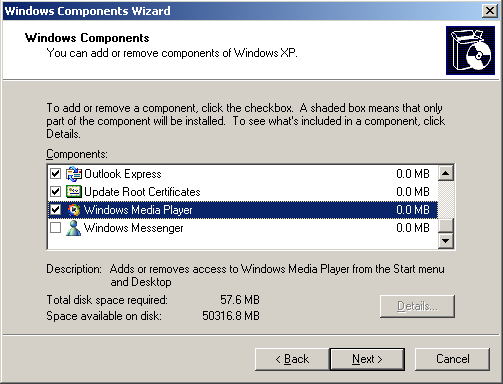
  1. Go to Control Panel → “Add or Remove Programs” → “Add/Remove Windows Components”.
    Add/Remove Windows components
  2. Scroll to the bottom of that list and select “Windows Media Player” from the list and un-check it
    Remove Windows Media Player
  3. Click Next to begin the removal of Windows Media Player from your system.

At this point, you can (and should) reboot, but I’m pedantic and usually run RegScrubXP and CCleaner to remove any of the leftover “breadcrumbs” from application addition and removal. Then I reboot.

When your machine comes back up, you’ll want to follow these steps:

  1. Download and install a copy of 7zip. You’ll need this to unpack the Windows Media Player installer you download in a moment.
  2. Download the latest version of Windows Media Player. The important thing is that you do not run the installer. Just save it locally on your hard drive for now. I saved mine to C:\Temp.
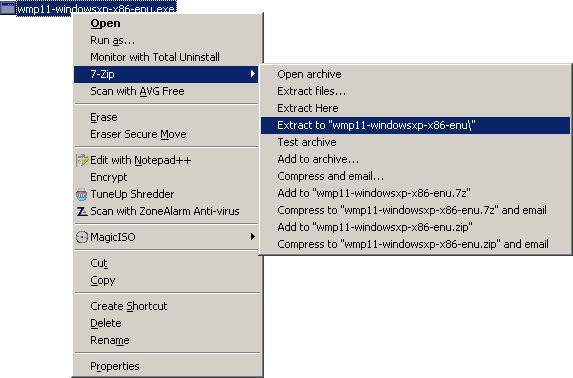
  3. Navigate to the location where you saved the Windows Media Player installer executable (called “wmp11-windowsxp-x86-enu.exe“) and right-click on it.
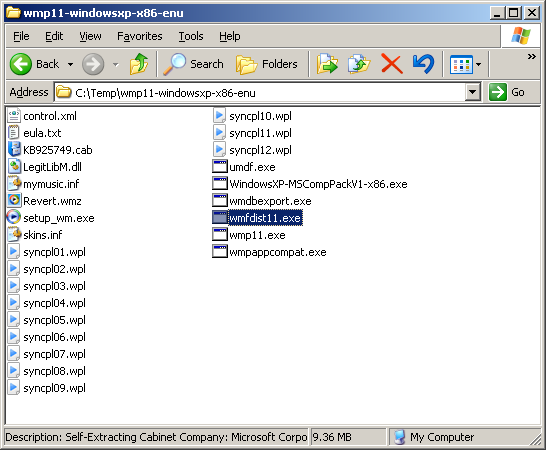
  4. In the right-click menu, go to 7-Zip → Extract to “wmp11-windowsxp-x86-enu\” and select that option. You’ll now have a directory with this name and several files inside it, as shown below.
    7zip Extract To...
  5. There are only two files you’re interested in here. First, run the installer named “wmfdist11.exe“.
    Run WFM dist
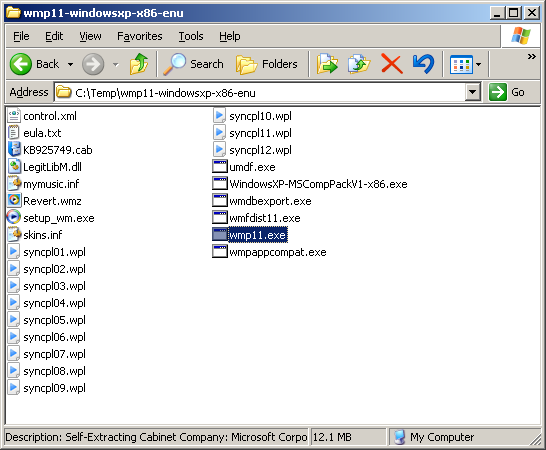
  6. When this completes (hopefully with success), run the one called “wmp11.exe“.
    Run Windows Media Player 11
  7. Reboot as indicated after the install, and you should be done!
  8. Go back to Netflix, log in and select “Watch It Now”, and choose a movie. You should now be able to watch your streamed movies using WMP 11 on your XP MCE 2002 system.

It worked for me, it should work for you as well.

Bad Behavior has blocked 576 access attempts in the last 7 days.