HOWTO Enable “God Mode” in Windows 7

Windows 7 UltimateThis past weekend, I “upgraded” my Lenovo Thinkpad x61s laptop from XP Professional to Windows 7 Ultimate, in preparation for some new gadgets I’m planning on testing with it.

Anyone who knows me well enough, knows I’m definitely NOT a Windows fan, but I do have to use it for some of my proprietary peripherals, my hybrid GTD system, and for my day job. Everywhere else, I use Linux. This is the reason I carry two laptops with me when I travel: One running my favorite flavor of Linux + VMware Workstation for “regular” Windows work, and the ultra-portable for running “real” Windows for cases where a virtualized Windows instance just won’t work.

A lot has changed in Windows 7 from what I’m used to with Windows XP, and there are a lot of annoying quirks, but I’m trying to stick with it, and keep it installed, so I can use the 12″ notebook as my “primary” on-the-go machine for the short term, until my second Lenovo T61p shows up to replace my current one.

Because there are a lot of changed settings, and everything is buried everywhere on Windows 7, in a seemingly illogical fashion, I had to find a way to get to it all.

Windows lacks a lot of power, customization and flexibility that Linux has had for a decade, so I continue to use and support Linux. But there are ways to eek out some power in Windows, and in Windows 7 I found such an option, and it’s called “God Mode”. Here’s how you activate it:

Read the rest of this entry »

Free unlock codes from AT&T! How? Just ask them for it!

AT&T SIM card logoI’ve been seeing all of this chatter on the web, YouTube and everywhere else about unlocking phone handsets, so they can work on any provider’s network. There are dozens of companies out there who offer unlock codes for any phone, any provider, for a fee of course. You can get them on eBay, you can get them on various online sites, you can get instructions through torrent sites and so on.

The one thing you can’t get, no matter how hard you look, is the actual algorithm they use to generate these codes.

Read the rest of this entry »

SOLVED: Windows 7 networking in VMware Workstation and ESXi

Tags:

VMware logoI’ve been using VMware Workstation for many, many years and I run a few hundred gigabytes of virtual machines for development and testing on various platforms. Some of these include physical machines that have been converted to virtual machines (using VMware Converter, which used to be called P2V [Physical 2 Virtual]) and some include purely virtual machines I’ve built from scratch using the default ISO file or installation media.

Almost all of my Windows virtual machines are physical machines converted to virtual machines, due to the cost and licensing of that platform.

I have a Windows 7 virtual machine that I’ve built up and have been testing with some new Office products and other snap-ins to help me test Funambol and productivity tools, but I noticed that the 64-bit Windows 7 version I have lacked any networking. It flat-out did not have a valid network driver.

I looked around on the CD, installed the VMware Tools from the menu, and made sure the current patches and service packs were applied (I keep a local repository of these to avoid re-fetching them over the WAN every time I have to rebuild my virtual machines). The 32-bit Windows 7 had working networking, but the 64-bit did not… and I couldn’t figure it out. I installed a 64-bit Windows XP VM, and it had the same exact problem… no networking.

Being the reverse-engineer that I am, I started looking into the VMware configuration and the files themselves, and grep’ing the source and strings(1) on the binaries, and then I stumbled upon the solution…

Shut down your Windows VM (do not suspend it, you have to shut it down completely) and open the main .vmx file in an editor and add the following line:

ethernet0.virtualDev = "e1000"

If your VM has more than one network device, make sure you set the right one in your .vmx file for your networking. I have several in my session: one for bridged, one for host-only and one for NAT. The NAT one happens to be ethernet0, so that’s the one I wanted the “public” networking functional on.

That’s it… when you reboot the VM, Windows will detect the “new” Ethernet interface, configure it for you, and then networking will work perfectly. Another VMware problem solved!

Ruminations on Baggage

Overstuffed luggageThe more and more I expose myself to people from all walks of life, the more I realize… almost everyone tries to offload their baggage onto anyone who will listen.

Look, EVERYONE has baggage. Those who say they don’t, are lying.

It’s not that you have baggage, or don’t have baggage, or have less or more than anyone else… it’s all in how you “pack” that baggage. I’m not talking about the kind the TSA cares about, I’m talking about emotional, social and financial baggage you carry with you every hour of every day.

But it is a lot like the kind of baggage you take with you on a flight. Let me explain:

Bad Baggage

If you fly, you know the type. They come bounding down the aisle with a roller that’s too wide for the row, banging into everyone’s elbows, knocking things over, causing a ruckus. They get to their seat, which is inevitably against the window.

They try to jam the handle of their luggage down, case bulging at the seams, and then try to fit it into the overhead. Naturally, it’s too wide, tall, over-stuffed or whatever. It won’t fit.

They try to take some stuff out, move things around, move other people’s luggage around, just to accommodate their own in the space.

They “affect” everyone else around them with their own baggage. Their problems become everyone else’s problems.

This is an example of “bad baggage”.

Good Baggage

Sleek, well-dressed, and gliding their custom, European-designed luggage down the aisle.. they get to their seat, they collapse the handle of their bag, and they stash it in the overhead, where it fits perfectly in the space allotted.

They sit down, and become part of the background of the other activity on the plane and you barely notice them at all. They’ve packed the right amount of luggage, they know how to pack it well, where it fits and how to store it away.

—-

I’ve met so many people lately that just affect (or infect?) everyone around them with their own personal baggage. They have so much, they burden other people around them with helping them carry it. It drains my energy and drags me down, like dragging a parachute behind that plane of luggage.

In a word, don’t be that person who can’t pack their own emotional bags and has to make everyone notice them when they can’t help but spill it all out on the rest of the world.

HOWTO: Repair your Outlook PST file from the commandline

The more I use Outlook 2007 for work and other data capture, the more I loathe how fragile the “Personal Storage Table” (.pst) file format is. You can’t relocate it on a network share because Microsoft’s locking mechanism will fail, and trash the data. At random times Outlook will just “hang” when trying to read or open the local .pst file, necessitating a force-quit, trashing the data. It’s so lovely, everyone should use it. Groan.

Normally, you can repair the issues found, by using a tool like ScanPST from Microsoft themselves, but that tool is strictly interactive, and can’t be scripted or automated or run from the commandline at all.

But there is a way, read on to find out how…

Read the rest of this entry »

SOLVED: How to Delete RSS Feeds Folder from Outlook 2007

Google RSS Reader

I don’t use RSS feeds inside Microsoft Outlook 2007 at all, although it’s an enabled feature by default. I only use Outlook for work, and while connected to the VPN, there is no way to get to the feeds anyway.

If I want to read RSS feeds, I’ll use Google Reader or similar tools. I’ve written a tool that takes any RSS, Atom or XML feed and converts it to HTML for use on a PDA, so I’m pretty used to digesting them.

But the “RSS Feeds” folder in Outlook is a nuisance if you don’t use it, and I just don’t even want it showing up in my folder list; it’s clutter in the interface that I don’t want in my way.

I searched and searched for ways to get rid of it, and it seems like nobody had the real answer. Everything I found was hacky or unworkable. There’s a lot of “You can’t delete it, just ignore it.” posts around, but that’s because people give up too easy and very few people are as stubborn as me.

So I figured it out, and my method is nice and clean. Here are the steps to do it (with step-by-step screenshots along the way):

Read the rest of this entry »

Quick-n-Dirty Math from the Shell

Tags:

Casio fx-115ES CalculatorI find myself needing to whip out a calculator a dozen times a day, but my calculator is never at my fingertips when I need it and the “Calc” application on my BlackBerry is too clunky to use with the trackball. I needed a faster way to do some quick math when I’m around the laptops I use every day.

Did I mention I’m horrible at math? Yes, it’s true. I’ve been working with computers for the last 2 decades, and I still struggle with some intermediate and complex math concepts. But that’s why we have computers and calculators, right?

I’m used to using bc(1) for all of those quick and dirty needs, but it requires that I load it up in an interactive fashion. It looks like this:

bc in Interactive Mode

$ bc
bc 1.06.94
Copyright 1991-1994, 1997, 1998, 2000, 2004, 2006 Free Software Foundation, Inc.
This is free software with ABSOLUTELY NO WARRANTY.
For details type `warranty'. 
scale=3
19931424 / 1024
19464.281
quit

I have to type each line one at a time. It’s effective, but clunky because it is manual and interactive. So I started looking around for other ways to do this, that weren’t so complex and could be done non-interactively.

Read the rest of this entry »

Microsoft is Still Propagating the Malware Problem

Microsoft LogoHaven’t we learned enough about viruses, malware, spyware and other malicious behavior online to avoid … running unknown executables to get to content? (video, documents, images) The AnnaKournikova.jpg.vbs debacle should have been enough to keep people from double-clicking unknown attachments and files that they couldn’t recognize, but apparently not.

This morning, one of my daily Google Alerts delivered me a link to a blog page promoting the use of Microsoft OneNote, which included a link to the Microsoft’s OneNote Demo video page. The Microsoft page included this helpful description:

Brief Description
Watch this introductory demo to learn about Microsoft Office OneNote 2007 and how to use it to gather, organize, and share your notes and other information.

But that Microsoft page has a link to download a file called “On2007DemoWhatIsOneNote.exe“. Wait, I thought I was going to be able to watch a demo of OneNote… not install something on my machine?

Why would I ever download an executable file to watch a video demo of OneNote? It’s not like there aren’t enough other ways to watch video online already.

But let’s just make sure I’m not being paranoid:

$ cabextract On2007DemoWhatIsOneNote.exe 
Extracting cabinet: On2007DemoWhatIsOneNote.exe
  extracting ON_WhatIs_final_ZA10177529.wmv

Nope, I’m not. Microsoft is still not being smart about protecting their users at all. They compressed the original source video into an executable file, to save 1 megabyte of bandwidth.

Not only does this propagate the problem of running unknown executables for the purposes of watching video or providing other non-application content, but it makes it prohibitive for someone on say… a Linux machine (like myself) or a Mac (like my work colleagues) to watch the video.

What if a non-Windows user wanted to learn more about OneNote? They have to have a Windows machine to run the executable, to unpack the video, to watch it?

Further to that problem, instead of using many of the industry-standard video encoding algorithms (MPEG4, MPEG, AVI or even Windows Media), they opted for the sole proprietary format that almost nothing but Microsoft’s own Windows Media Player can play: Microsoft ASF. Well-done, Microsoft… well-done.

Since I run Debian and Ubuntu, and patents and copyrighted algorithms prevent me from playing them natively in Linux, I tried to use Medibuntu to leverage that.

But guess what? That doesn’t work either. Ridiculous.

When people ask me why I run Linux instead of Microsoft, it is examples like these that validate my choice in an operating system.

SOLVED: Fixing a Minor Nit with Office Communicator

UPDATED to include Windows 7 information (see below)

Office 2007 Retail BoxLike many other corporate users before me, I’m forced to use “Microsoft Office Communicator” (otherwise known as “MOC” or “OCS”) as my main, internal IM client. My employer used to let us use AIM and other public IM protocols through a proxy, but after the acquisition, all of that flexibility went away… and so did the ability to communicate with my internal and external team.

One of the things that always bothered me about MOC, was that it would present me with the username and password dialog, but no way to save the password. I had to manually enter the username and password each and every time.

Unacceptable!

My machines are all heavily encrypted, so someone breaching my IM password would be small potatoes, once they get past the moat, drawbridge, boiling oil, archers and saw blades of my encryption. I don’t mind having some applications save the password, to make it more convenient for me to use it. MOC is one such app.

Digging around, I realized that this might be due to my machine not being directly joined to the domain, or some other artifact of working “mostly-remotely”. Where did I go next? Yes, straight to the registry… where I found the fix.

To get MOC to prompt you for, and then save your password, launch regedit and locate the following key:

HKEY_LOCAL_MACHINE\SOFTWARE\Policies\Microsoft\Communicator

If you don’t see a DWORD key here called “SavePassword“, go ahead and create one. To create the key:

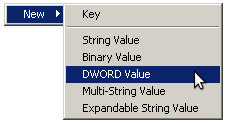
  1. Right-click on the right-side and select “New” -> “DWORD Value“.

    regedit DWORD value

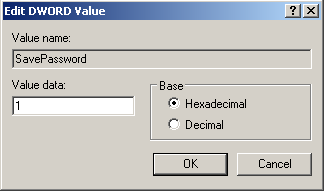
  2. Name the key “SavePassword“, and set its value to 1

    Microsoft Office Communicator SavePassword dialog

  3. Click [Ok] to exit the dialog

If you want that in a .reg style key that you can import directly, cut and paste the following into a file called ‘moc.reg‘, and double-click it in Windows to set this key in the registry:

[HKEY_LOCAL_MACHINE\SOFTWARE\Policies\Microsoft\Communicator]
"SavePassword"=dword:00000001

Here’s what the possible values mean:

Not set = User choice (default).
0 = Users do not have the option to save password, the checkbox isn't even shown.
1 = Users have the option to save password.

This key can also be set under both HKEY_LOCAL_MACHINE and HKEY_CURRENT_USER, but the policy setting under HKEY_LOCAL_MACHINE will take precedence if it is set in both places.

Now if you launch MOC, it may prompt you for a password, but you can now click the “Save Password” checkbox to have it save it for you.

Problem solved. Now onto the next yak on my list.

UPDATE: For Windows 7 users using Microsoft Office Communicator (including R2), you’ll find the key stashed in:

HKEY_CURRENT_USER\Software\Microsoft\Communicator

But this key is WRONG, and will be overwritten with a value of ‘0’ every time you launch MOC, or exit MOC. In order to fix this, you’ll need to create a key called ‘Communicator’, and inside that, a key REG_DWORD value of ‘SavePassword’ with the value of ‘1’.

When you launch Communicator again, you’ll get the “Save Password” checkbox, which you can check and never enter it again (well, until your password changes again of course).

SOLVED: Building VMware Workstation modules on Linux 2.6.32

Tags: ,

VMware logoI use a lot of VMware Workstation here to manage my development and testing, as well as virtualizing my work environment. Since my daughter crashed my laptop (quite literally, by accidentally dropping it on the floor), I had to rebuild it. The new build is running Ubuntu 10 (“Lucid”), and with it comes the 2.6.32-10-generic kernel.

Since VMware Workstation was released before 2.6.32, it doesn’t build clean. If you see errors building the initial modules, you’ll need to patch it. The errors you’ll see will look like this (scroll down for the simple fix):

Read the rest of this entry »

Bad Behavior has blocked 536 access attempts in the last 7 days.