
Archive for November, 2026
Amazon Black Friday, or ANY day, cart pricing update script
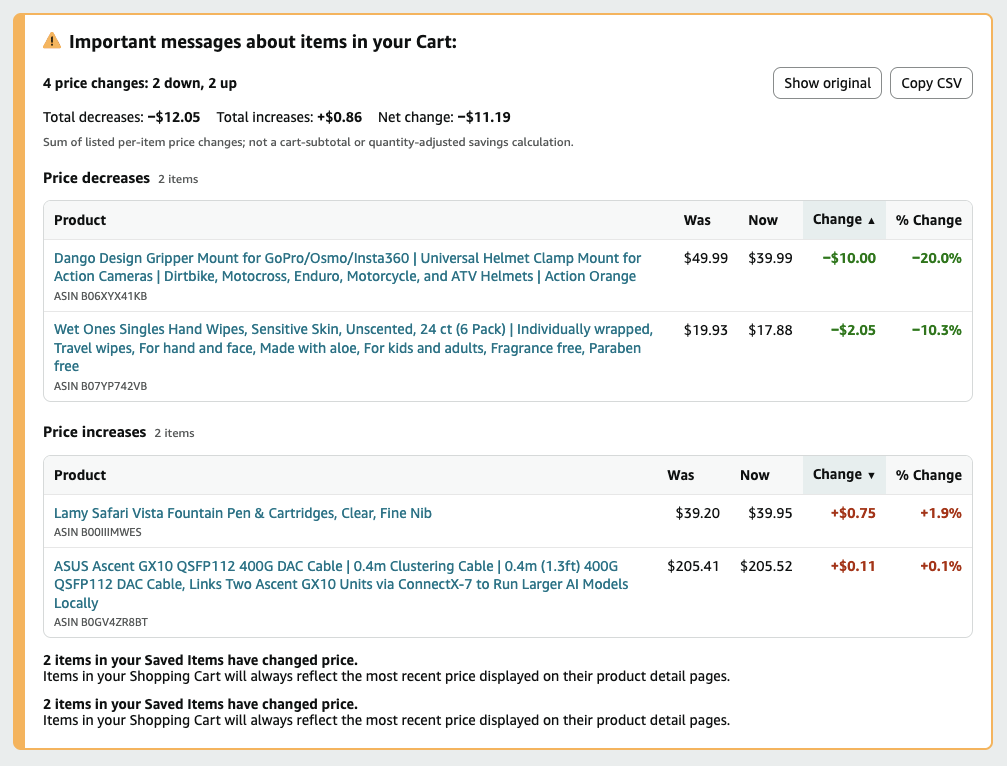
It’s always bothered me that when you add items to your Amazon cart, and the price of those items changes, Amazon only shows you a quick text table showing what went up or down in price. If you click away and back, that data is gone. The information they show is a plain text paragraph that you have to read like a novel, to mentally calculate which items went up or down in price.
It’s painful, unusable, and largely useless.
So, I decided to write a browser userscript to “fix the glitch”. Now when you visit your cart and prices have changed since the last time you loaded it. It supports saving the table as a CSV for later review or comparison, sorting the table’s increase or decrease by table headers, and tells you exactly what you need from this data: “Did the price of the item(s) I want to buy, go up or down?”, so you can make an informed purchase, or leave the items in your cart for another time.
First, if you don’t already have a userscript add-on in your browser, you’ll want to install one. There are several, Greasemonkey, Tampermonkey and Violentmonkey. I use the latter, as it’s the most feature-rich and up to date.
Once you have the add-on installed, use the add-ons option to create a new script, and paste in the following script contents:
https://gist.github.com/desrod/57aa3ddd85a26ebc0bd5f60749c57fea
Or click here for a direct link: amazon-price-cart-usability.user.js and your installed add-on will detect it and install it for you into your browser. I prefer Firefox on all platforms, but this will work in Chrome as well on Chromium based browsers, such as Chrome, Brave or Thorium.
Now when you visit your Amazon cart, you’ll see a much enhanced, much improved Amazon Cart experience, just in time for all of those Black Friday price increases to mislead you into thinking the price is being discounted right before you make your purchase.
I’d love feedback if anyone finds this useful!