
SOLVED: How to Disable Ctrl-Q in Firefox
As a hardcore Firefox user with no less than 30-50 tabs loaded in the browser at any given time, it always annoyed me that they put the shortcut for closing a tab (Ctrl-W), right next to the shortcut for closing the entire browser itself (Ctrl-Q). I have 38 extensions loaded into Firefox right now as I type this blog post, and next to my keyboard itself, Firefox gets the most use.
When I’m working in the dark, or not looking at the keyboard and I fat-finger the ^W key-combo, I frequently hit ^Q by mistake, closing the browser and all of the tabs with it. ARG! Not fun.
I finally got tired of having to restart the browser all the time when I close it by accident, and decided to look for a fix. Luckily I found it in an extension called “keyconfig” that does exactly what I need!
“keyconfig adds the ability to create new or modify existing shortcuts defined by a
element, but only changing those which itself call a function (those with a command or oncommand attribute) has an effect (all others fulfill only cosmetic purposes it seems and are grayed out).”
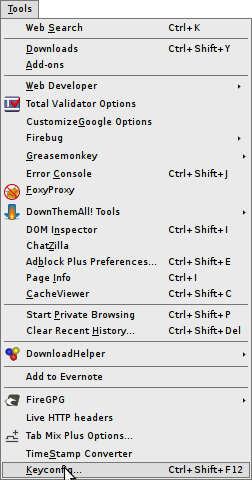
Once I installed keyconfig and restarted Shiretoko, I was able to go into the prefs for it as shown here:
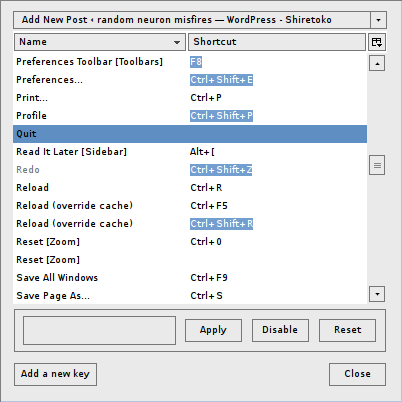
Scroll down to find the “Quit” menu accelerator in the list. Highlight it and click “Disable”
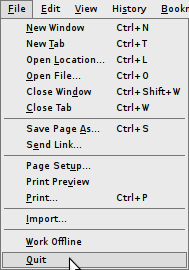
Closed out of the prefs, and went to File, and voila! No more Ctrl-Q next to the Quit option!
For those who might be wondering about my 38 Add-ons in Firefox, they currently are:
- AdBlock Plus version 1.1.1
- Better GCal version 0.3
- Better Gmail 2 version 0.9.5
- BetterPrivacy version 1.45
- CacheViewer version 0.6
- ChatZilla version 0.9.85
- ColorfulTabs version 3.9.7
- Console2 0.5
- CustomizeGoogle version 0.76
- DOM Inspector version 2.0.3
- DownThemAll! 1.1.7
- DownloadHelper version 4.6.4
- Evernote Web Clipper version 3.0.0.57015
- FireGPG version 0.7.10
- Firebug version 1.4.5
- Firefox Showcase version 0.9.5.1
- Flashblock version 1.5.12a2
- FoxyProxy version 2.14
- Google PageRank Status version 1.0
- Googlepedia version 0.6.1
- Greasemonkey version 0.8.20090920.2
- Hyperwords version 5.6.1
- Linkification version 1.3.6
- Linky version 2.7.1
- Live HTTP Headers version 0.15
- NoScript version 1.9.9.14
- PageSpeed version 1.3.0.1
- Power Twitter version 1.37
- PrefBar version 4.2.0
- Read it Later version 0.9948
- Remember The Milk for Gmail version 1.0.4
- Resurrect Pages version 2.0.4
- Tab Mix Plus version 0.3.8.2pre.091012
- Tab Sidebar version 2.5
- TimeStamp Converter version 1.4.3
- Total Validator version 6.1
- VMware Remote Console Plug-in version 2.5.0.122581
- Web Developer version 1.1.8
- keyconfig version 20080929
Mike Van Pelt said on January 26th, 2012 at 2:16 pm quote
Keyconfig looks pretty nice, but if all you want is to disable CTRL-Q (or, at least, get a warning popup that lets you cancel the quit) you don’t need a plugin.
Type “about:config†as the URL. You may get a “You break it, it’s not our fault†sort of warning; click on through that.
Search for “quitâ€.
Double-click on the browser.showQuitWarning line to set it to true.
And that’s it!