
Blackberry and the Productivity Myth
 When I’m traveling to and from the New York office, I see a lot of people using Blackberry devices. They treat them like a third arm, a new appendage, permanently attached to their outstretched hand.
These people constantly check their Blackberry devices every minute or two, no matter what they’re doing; eating, standing in line to buy tickets, walking down the road or waiting on the subway. They can’t STOP looking at it.
The problem is that they mistakenly believe that having a Blackberry automatically makes them
- more important individuals,
- busier than you could ever possibly be, and
- more productive than anyone around them.
These people will even argue with you and tell you that you can’t possibly get more email than they get, you can’t possibly have more projects than they have, you can’t possibly KNOW what it’s like to be busy… because you don’t have a Blackberry.
Let me burst that bubble right here and now.
The fact that you own a Blackberry alone, shows that you are not in control of your own workload, your own tasks, your own projects. This is further reinforced by the fact that you can’t stop looking at it every 2 minutes.
How much focus can you possibly have when you’re working away on something and your Blackberry buzzes on your desk or at your side? What’s the first thing you do? You drop everything and attend to it, like it was a crying infant in need of food.
You just broke your focus. You fiddle with your device, and then you try to regroup with your previous task, only to be interrupted again minutes later by another Blackberry alert. Multiply this out hundreds of times a day, and you get nothing done. It’s no wonder you need to carry it 24×7 and work until 7pm at night. You’re not productive at all, you’re barely scraping by.
If you WERE on top of your projects and tasks, you wouldn’t need to check your email every 2 minutes because you’re already on top of it. You wouldn’t need to constantly attend to it, because everyone knows where your projects and tasks are, they don’t need to follow up with you on them, because everything is already on-track or ahead of schedule…. right?
The other thing I’ve noticed (and verified by talking to dozens of people who use these devices), is that people use them to READ their emails, but they never reply to them from the device. They read their emails, then go back to the office later and read those same emails again and reply to them from their office PC.
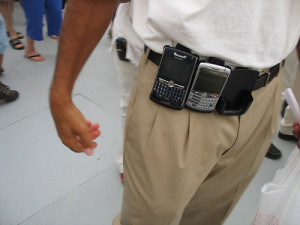
Riddle me this, Batman: What is the point of reading an email more than once? You read it, you reply right there if you have the time, or you write down some information in your notepad/PDA, and you delete it. The last step at the end of reading EVERY email is to delete it. If you’re going to read an email on your Blackberry, reply to it right there, take notes for later action items and delete it.
You should never have to read an email more than once… unless it’s some research email that is archived off into a folder specifically for that purpose.
There’s a tangent piece of productivity here as well, unrelated to Blackberry devices but definitely made more visible by those who use them. I see people at work who check their email 10 to 20 times an hour, every hour throughout their workday. I check my email 2-3 times a day, tops. I don’t need to check it more often than that (and yes, I get hundreds of important emails every day, 80% of which require my personal response and attention).
If someone needs something urgent from me, email is the wrong vehicle to use to get my attention. These people know to call me on the phone or find me in person to get to me. All of that time I’m NOT spending looking at email, is spent working through my projects and tasks. I would be nowhere as productive as I am if I constantly checked my email all day.
I have a Treo smartphone, and I get email on my device when I request it, not when it comes into my remote Inbox. I know I’ll respond to all of my emails at the end of every day, and my Inbox will be clean and tidy every night before 5pm. I don’t constantly check my PDA every 2 minutes because I don’t have to.
The more in control of your projects, tasks and your life as a whole, the less you need these things interrupting you from enjoying the rest of your non-work time.