
Archive for April, 2008
Windows Security vs. Linux Security Quote of the Day
Linux and FreeBSD aren’t inherently more secure — they’re just operated by people who are inherently more aware of security.
Google Calendar Sync and CompanionLink for Google Calendar
Tags: sync
I am a customer of a tool called CompanionLink for Google which allows me to sync my Outlook/Palm calendar to Google Calendar, so my friends/family can see where I am at any given time.
The cost for their software was relatively cheap, and it appeared to work well. There are some inherent issues and bugs in the tool, which still aren’t resolved, but it does what it claims to do in a very simple and fairly painless way.
Recently I noticed that Google has released their own free tool called “Google Calendar Sync” to do essentially the same thing.
The Google tool doesn’t support as many platforms and PIMs as CompanionLink, but it is free, and it is written/maintained by the people who interface directy with Gmail, so I figured it should work “better”.
I was wrong.
For some reason, both of these tools seem to “ignore” random events on my calendar, while including other random events around the same days and weeks. There is no obvious pattern to why these events are skipped, or why I can’t get them into my Google Calendar.
I’ve exported all of my calendar items to a local file, removed the categories, deleted my local calendar entirely, re-imported all of the events clean and told both tools to do a “Purge and Reload”, pushing everything from my local calendar into Google Calendar.
Nada.
Both tools fail in almost exactly the same way. This leads me to believe something in the way Gmail is accepting the calendar data is causing it to “ignore” some of my events (a few hundred).
So now I’m back to not using either of them, because they can’t do what I need. I’ll probably talk to CompanionLink and see if they have a fix, or can issue me a refund for my purchase price.
Frustrating, since I don’t yet have one unified place for all of my calendaring to go. Grr!
UPDATE: I have a fix. The fix is to export my entire calendar into CSV format, then log into Google Calendar, delete all of the calendar items, then import the CSV fresh every time.
So much for 2-way syncronization. Sigh.
AT&T charges customers more to pay with cash
Tags: ircI thought it was a joke when someone spoke about this in IRC, until I Googled around and found the actual story. Shocking!
Rhonda Payne went to an AT&T Wireless store in Calhoun, Ga., recently to pay her phone bill in cash. She’d been hit by ID theft and was forced to close her checking account, so she was worried she wouldn’t be able to mail a check on time. But when she arrived at the store, she was in for a surprise.
Paying in person, she was told, costs extra — $2 extra.
Payne objected to the “administrative charge” that was added to her bill but got no sympathy. Instead, she said, she was told she should consider herself lucky because the fee was about to go up to $5.
“I was told that it was a courtesy to take cash” she said. I said, “Are you kidding me?”
It’s no joke. Beginning earlier this year, AT&T Wireless began to charge customers who pay their bills in their stores.
“It is a way of saving money … it helps us keep our costs lower,” said AT&T spokesman Mark Siegel. “We want our associates to spend their time helping customers as they are thinking about their wireless plans or looking at phones.”
Since when was it a penalty to use REAL cash to pay your bills? What about people who don’t have a bank account (and the number is growing, as the economy crumbles down). What about people who can’t pay electronically? What then?
I can’t help but think this is also related to the fairly recent advertisements from VISA Check Card where they make it seem like paying with real cash is embarrassing, annoying, slow, etc.
In fact, as the commercial below shows… all this industry wants to see is cash flowing in, as fast and efficient as possible, with as few interruptions as possible. If you pay in cash, people groan at you, look at you funny, and make you feel like you’re some sort of outcast.
If you haven’t seen The Zeitgeist Movie yet, please take the time to watch it. You can watch it online, download a copy or purchase the DVD version for yourself or your friends.
It goes through exactly why we’re seeing this shift away from physical money, and how it’s happening at very subtle, almost imperceptible levels in all facets of our society.
I STRONGLY recommend watching it, and passing the knowledge you glean from it on to others who might want to know more.
When all of our cash transactions are digital, when all money is digital and no longer physical, you can be monitored in ways you’ve never even thought of before. Not only that, but your ability to transact business in the world can now be shut off in one keystroke.
BAM!
No more groceries.
No more gas.
No more airline flights.
Nothing.
Accidentally have the same last name as someone else on a list you can’t get yourself removed from? Oops, now your life is literally turned off.
Perhaps Morpheus wasn’t so far off after all… maybe in the eyes of the current government we’re a lot closer to these than we think.

Keeping clean and shiny (Microsoft) Windows
Tags: VMwareI have two Windows machines here that I use for those tasks that don’t quite lend themselves to Linux or Windows-in-VMware. I thought they were updated to current with all latest versions, service packs and updates… until I stumbled on a tool called Personal Security Inspector by Secunia.
PSI is a tool that will scan all of your programs and applications and tell you which ones are vulnerable, insecure, out of date, end-of-lifed, and many other things.
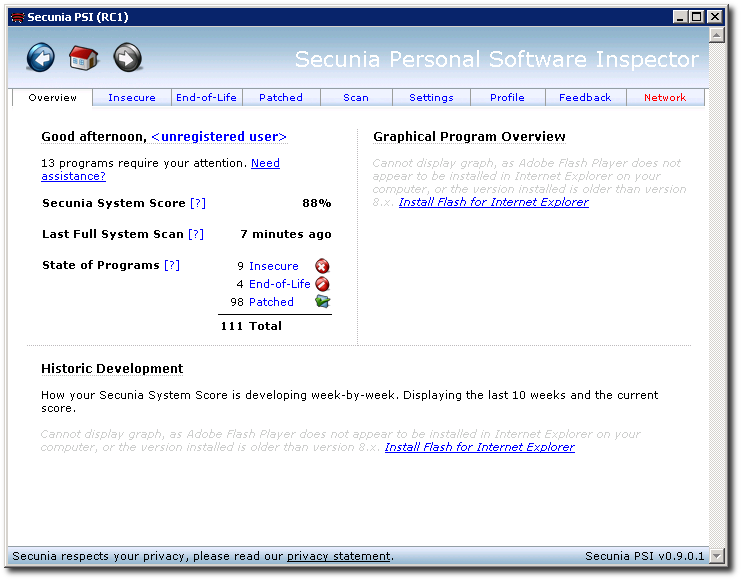
I ran it on my Windows laptop which is only about a month old, straight from IBM… and it scored 88%.
[More screenshots here]
The interface is very smart, and once it finds the applications which need updating/patching, it lets you download them directly from the PSI dashboard, where you can install them and re-run the scan.
As you can see in the above screenshot, 9 programs that were out of date were found on my system and needed updating. These included things like Firefox, the Adobe Flash plug-in, VLC, XnView and others.
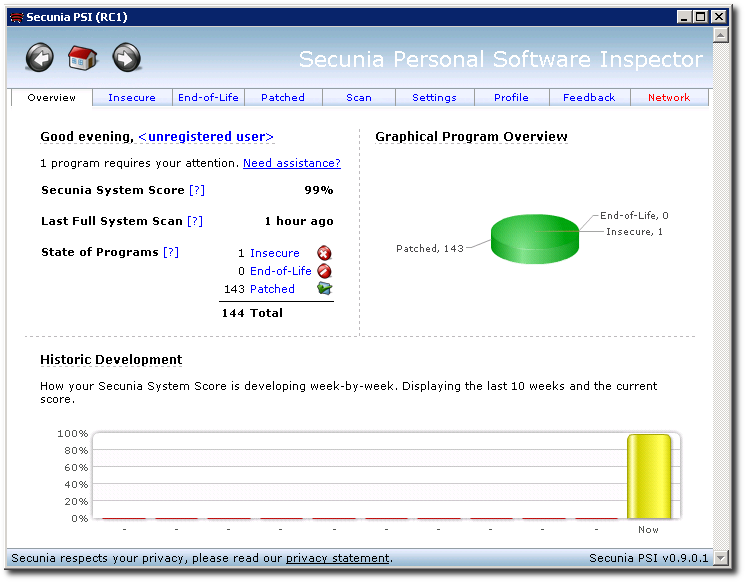
After I updated as many as I could, I re-ran the scanner and it now found the following results:
[More screenshots here]
You can see that even the interface changed, because now I have the proper Flash version installed and configured within MSIE to render those graphs on the right-side.
There’s a lot more to it, and I haven’t done it enough justice here, but if you run Windows.. give this a try and see if it doesn’t find many things on your system that could be potential security holes on your machine.
The only one I couldn’t seem to update was the Adobe Acrobat application but I’ll look into that later.
Returning a list of anonymous proxies
Tags: PerlBack in October of 2007, I started writing a little tool to build MFA 2.0 sites on the fly.
This tool (in Perl of course), allows me to create a new WordPress blog targeted to a very specific niche, populate the WordPress database with hundreds/thouands of articles that target that niche, and some other fancy things with lots of trickery under the hood. My Diabetes Information and Acne Skin Treatment websites are two examples of works I created in about 30 minutes with this tool back in October.
The article sites that I point to for content are attempting to drive traffic to their site and they implement all sorts of tricks on the server-side to try to thwart spidering and bots. They want “real humans†to read their content.
So I came up with the idea of using a random proxy server for each request. It slows down the speed with which I can spider articles, but it also doesn’t put me on an automatic block/ban list.
The problem with public proxy lists is that they become stale very quickly, so I needed a way to make sure every proxy I use is alive, valid and accepting connections to the remote site I’m querying for article content.
Enter my return_proxies() function in Perl, which does just this:
sub return_proxies {
        my $link        = 'http://proxy-site/list.txt';

        my $ua = LWP::UserAgent->new;
        my $rand_browser = random_browser();
        $ua->agent($rand_browser);

        my $req         = HTTP::Request->new(GET => $link) or die $!;
        my $res         = $ua->request($req);
        my $status_line = $res->status_line;
        my $html        = $res->content;

        my $t           = HTML::TreeBuilder->new_from_content($html);
        my @output      = map $_->as_HTML, $t->look_down(_tag => 'td', class => qr/dt-tb?/);

        my @proxies;
        foreach my $ip (@output) {
                (my $address) = $ip =~ /((?:\d+\.){3}\d+\:\d+)/;
                push @proxies, $address if $address;
        }

        # print Dumper(@proxies);
        return @proxies;
}
I call this in my fetch_page() function like this:
        my @proxies     = return_proxies();
        my $rand_proxy  = "http://$proxies[rand @proxies]“;
        $ua->proxy(['http', 'ftp'], $rand_proxy);
So far it works very well, no issues at all that I’ve seen.
Obviously there’s a lot more to it than just this… but I can’t give away all of the secrets to my code, can I?
Random Friday Night Things
Gas Ascent
Gas prices are now up 11.71% from last week. We’ve gone from $3.32/gallon to $3.75/gallon in 7 days and the price keeps on rising. My local gas station goes up $0.01 to $0.03/day, every day.
Fixing Dovecot SSL Certificates
My local Dovecot certificates expired, so I had to re-gen some new ones… but the problem is that Debian’s dpkg-reconfigure for the dovecot-common package is a bit botched, and complains that there are SSL certs already, and does not re-gen new ones.. even when I manually rm them from /etc/ssl/certs/.
The solution? Do it all manually, of course.
First, check your existing certificate’s validity and expiry:
$ openssl x509 -in /etc/ssl/certs/dovecot.pem -noout -text| grep -A2 Validity
        Validity
            Not Before: Apr 21 12:21:07 2007 GMT
            Not After : Apr 21 12:21:07 2008 GMT
If the expiry is past-due, find and delete the existing dovecot certs:
find /etc/ssl -name 'dovecot.*' -exec rm {} \;
…and re-gen new ones… like this (this is where it gets ugly, but follow along one command/step at a time):
cd /etc/ssl/certs
PATH=$PATH:/usr/bin/ssl
HOSTNAME=`hostname -s`
FQDN=`hostname -f`
MAILNAME=`cat /etc/mailname 2> /dev/null || hostname -f`

# These next lines get run all in one command, from open parenthesis to end parenthesis.
(openssl req -new -x509 -days 365 -nodes -out $SSL_CERT -keyout $SSL_KEY > /dev/null 2>&1 <<+
.
.
.
Dovecot mail server
$HOSTNAME.$DOMAINNAME
$FQDN
root@$MAILNAME
+
)
Now you should have two shiny new certs stored in:
/etc/ssl/certs/dovecot.pem and /etc/ssl/private/dovecot.pem
It's a good idea to examine these with the openssl command above, just to be sure they're correct. You should now see something like the following:
$ openssl x509 -in /etc/ssl/certs/dovecot.pem -noout -text| grep -A2 Validity
        Validity
            Not Before: Apr 23 06:30:49 2008 GMT
            Not After : Apr 23 06:30:49 2009 GMT
These now get poked into your /etc/dovecot/dovecot.conf file
ssl_cert_file = /etc/ssl/certs/dovecot.pem
ssl_key_file = /etc/ssl/private/dovecot.pem
The reason I had to go through this rigmarole was because the Thunderbird nightly build I am now using to import all of my IMAP mail archives to Gmail outright rejects the cert if it has expired.
Previous versions would issue a warning that the cert was expired, and you could continue anyway. These new versions are much less permissive, and outright block access.
To import your new Dovecot cert into Thunderbird, you have to jump through a couple of hoops.
Launch Thunderbird and go to Edit → Preferences → Certificates.
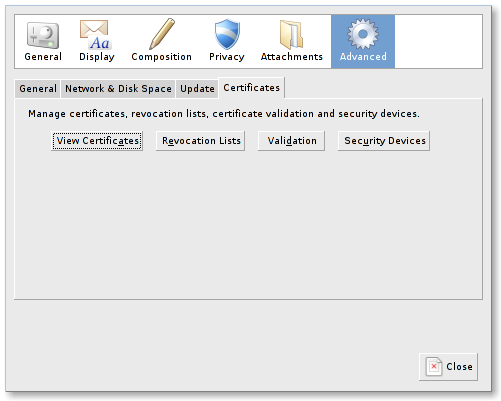
Click on the "View Certificates" button and go to the "Authorities" tab.
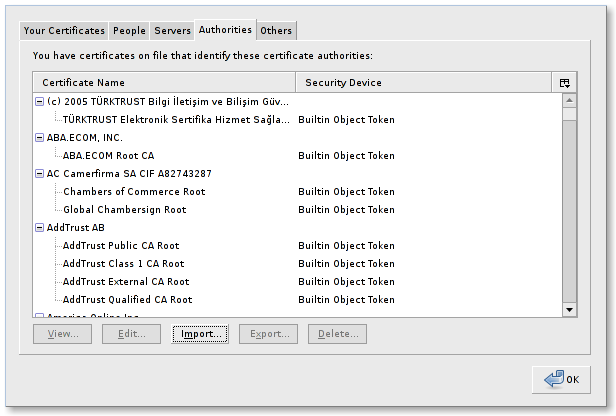
Click "Import" here and a file picker dialog will pop open. Navigate to your dovecot.pem certificate (the one that was put into /etc/ssl/certs/, not the one in /etc/ssl/private), and import that.
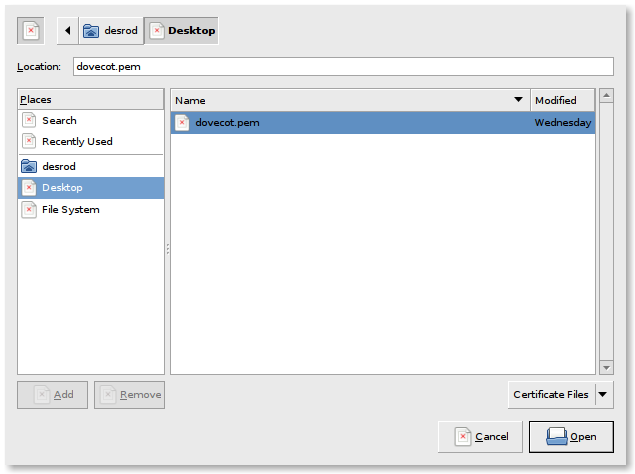
Ignore my ugly icons in these screenshots, they're 'broken' because I'm testing something in the background.
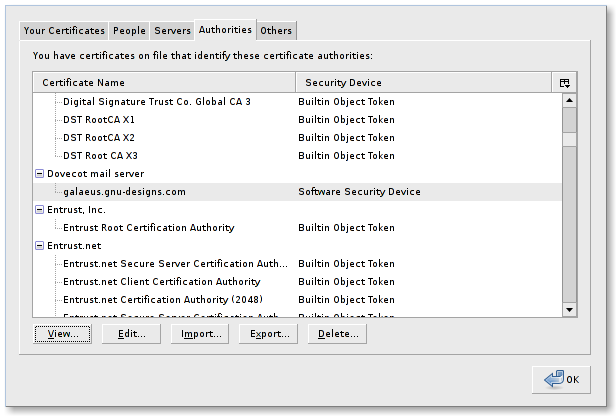
After this has been imported, if you go back to the Authorities tab and scroll down a bit, you should see a new certificate listed for Dovecot, as shown here:
If you select this certificate and click on "View", you should see something like the following:
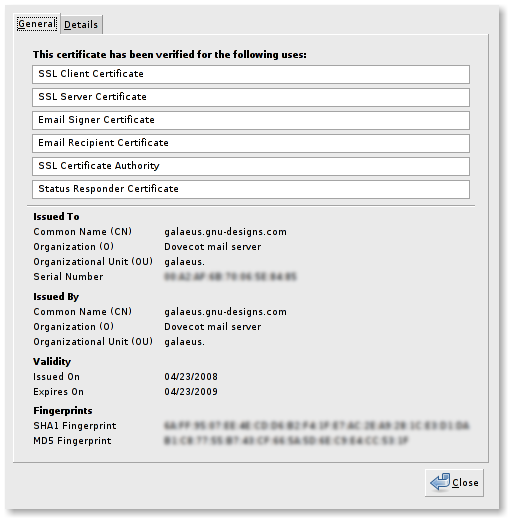
Voila! Now you can use your Thunderbird nightly build against your local IMAP without connections being denied.
Stupid, silly Gravatars
I noticed that there is a new WordPress out with over 70 fixes. That alone plus the security issues closed merits an upgrade for me across all of the user, professional, MFA and other blogs I run and host for people.
The biggest bug fixed in this one has been affecting me for weeks now, and I've reported it and am glad to see they claim to have fixed it.
But there was something wacky with my theme, which caused user's avatars to be invisible. I trundled over to the main Gravatar site to look for answers, and saw that they have their own WordPress plugin to handle that.
I downloaded the plugin, installed it and was not surprised to find that it didn't work at all.
Sigh.
So I cracked open the source, and noticed that it flat-out was non-functional. Even their instructions say to use the following syntax:
<img src="<?php gravatar("R", 40, "http://www.somewhere.com/heatvision.jpg"); ?>" alt="" />
That url they provide in their instructions leads to a 404, because it doesn't exist. Easy problem to solve, but the code itself is never reached.
Pouring through more templates and WordPress source revealed the subtle answer:
<?php echo get_avatar($comment, 40 ); ?>
I wrapped that in a proper div with some quick inline styles, and now avatars work for public comments on posts:
<div id="gravatar" style="float:left;margin-right:0.5em;"><?php echo get_avatar($comment, 40 ); ?></div>
I wish some projects would test their code before they release it, or at the very least before they claim that it works "...just like this...".
Clear, succinct and to the point. He speaks for us all.

A transcript of FBI Director Robert Mueller’s exchange at a House of Representatives hearing with Rep. Darrell Issa hit c|Net News recently. Issa is a California Republican that made his fortune by founding Directed Electronics, a publicly traded company that sells car alarms and home theater loudspeakers.

Issa also is a member of the House Intelligence Committee, which is holding a closed hearing on Thursday devoted to the Bush administration’s so-called Cyber Initiative. In January, President Bush signed a pair of secret orders–National Security Presidential Directive 54/Homeland Security Presidential Directive 23–that apparently deal with detecting and preventing Internet disruptions.
In short, the FBI wants the ability to intercept and monitor traffic going INTO Internet backbone choke-points. They’re already tapping these now, but they want the ability to “legally” intercept these communications.
tjstork had some strong words in a post he made in a thread on Slashdot about this exact issue today:
I do not know in my right mind how, it became permissable for George Bush to undermine civil liberties in the same way that we always argued it was wrong for Democrats to do.
Liberty and Freedom do not care about political affiliations and political parties. If a federal practice is wrong, it is wrong regardless of which party does it. If we do not want Hillary Clinton or Barrack Obama or Bill Clinton reading our e-mail, then we should not tolerate George Bush or John McCain doing it either. Doing so only undermines the very essence of the rule of law and the fabric of our democracy. It is the totalitarian regime that justifies itself through personality, not the free one.
We conservatives have many differences with our fellow liberal americans and we always will. However, the very thing that makes us American, the idea, as Jefferson said, “We are endowed with certain inalienable rights … To secure these liberties, governments are instituted among men”, is under assault and in the name of a rival that frankly is not nearly the equal of the rivals that we have faced in the past. We overcame the British Empire to secure our independence. We fought the Barbary Pirates, our own Civil War, Imperial Germany, and Nazi Germany, and then put our cities on the nuclear firing line against the dark stain of Communism… and we NEVER once entertained turning America into a land of checkpoints and identity requests.
What is going on now in our country is madness. America is not supposed to be a place where guys with machine guns are walking around train platforms, asking if you have a driver’s license with federal approved features. America is not supposed to be the place where the government collects data on all of its citizens.
Yeah, the muzzies blew up the world trade center, and its sad that those people died. But, the British burned our nation’s capital to the ground, the Germans sunk the Lusitania, the Japanese bombed Pearl Harbor and captured an army of 80,000 men of ours. We’ve been attacked before and we’ll be attacked again, and what makes America special is that we keep our freedoms, rather than surrender them.
There’s a million dead soldiers rolling over in their graves because we have so easily surrendered every freedom they fought for. It’s an insult to them, to our national heritage, to turn our country into some sort of crappy police state because a few muslims with box cutters give us the willies.
Support those candidates, regardless of party, that promise to end the Dept of Homeland Security, promise to repeal the USA PATRIOT ACT, and join me in a call for a Constitutional Amendment that bars the Federal Government from intercepting any electronic communications within its borders, unless it can prove before a court that those communications are with another nation with which the USA might be in a state of war.
And another reply from an AC in the same thread:
The current generation has no idea what their ancestors fought and died for. To them, the Constitution is that “dumb thing they had to learn for some test back in school.”
The words of the Constitution, the rights it promises, the beauty and eloquence of the promises themselves — all lost on a generation that mocks those who correctly punctuate their MySpace page.
So who does that leave to defend these freedoms? Us. Every geek who’s ever learned something from the Internet, every one of us who’s ever spent a night on IRC going over a disassembly with some fellow hackers from around the world — every single one of us is threatened by this sort of crap. And every one of us should work to fight it. Whether it’s refusing to turn over traffic logs, enabling mandatory SSL for the sites you administer, or just teaching your family members how to use GPG, there’s something that you (yes you — the one reading this right now) can do to make this sort of illegal, immoral, borderline fascist spying ten times harder.
Realistically though, this sort of monitoring is coming. They may not get it this time around, but you’ll be damned sure they will eventually. The ‘net’s too big a “free speech zone” for them to ignore now. We won’t be able to stop them from getting access to our data, so we’ve got to be ready. Assume that everything you send and receive is monitored. Act accordingly. If the FBI wants to spy on all citizens, then their next war will be virtual. The average citizen doesn’t know what AES is. He doesn’t know how to check a SHA-256 hash. He doesn’t know why SSL is useful. He can’t send an e-mail protected by GPG. But we can. And in the coming war… well.. I guess that makes us the terrorists. So ready your arms, fellow terrorists, and let the jihad begin.
I think they speak for many of us.
Another reason not to vote for Hillary Clinton
 As if we needed more reasons NOT to vote Hillary Clinton into office, here comes another one:
Democratic presidential Hillary Clinton has threatened to “obliterate†Iran if it launches a nuclear attack against Israel as she fights for her own political survival.
“I want the Iranians to know that if I’m the president, we will attack Iran,†Senator Clinton told ABC News, asked what she would do as president were Iran to launch a nuclear attack on Israel.
â€In the next 10 years, during which they might foolishly consider launching an attack on Israel, we would be able to totally obliterate them.â€
She’s not even President, and she’s running her mouth like world politics is some sort of game where she can just throw around our already-stretched-thin military like plastic soldiers on a game board in her office.
It is also important to note that Hillary was only one of TWO SENATORS out of 100 that declined to vote to remove the retroactive immunity clause from the Telecommunications Wiretapping law. Do you really want to elect someone who SUPPORTS the illegal and immoral wiretapping of American citizens? I most-certainly do not.
Barack Obama is no better, and neither of them are getting my vote this year (nor is McCain).
People this dangerous should not be granted power by the people, ever.
Feeding on Feeds for Productivity: Sage vs. Google Reader
I use a lot of rdf/rss/atom feeds to keep up with the trends in general news, gadgets, software, releases, productivity and many other things.
Until very recently, I was using an add-on to Firefox called “Sage“. Sage has a lot of really slick features which I have grown accustomed to… the largest of which is the ability to see all the feed summaries at a glance, on one page, without scrolling. It looks like this:
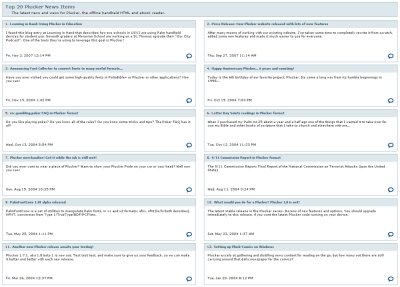
I like the way it docks to Firefox and is accessible or tucks away on the left sidebar with a simple Alt-Z key combo.
But a friend recently asked me if I’d tried Google Reader, and honestly… I’d never heard of it. He lauded the benefits of it being tightly integrated with Google’s suite of other products and applications.
As I usually do when someone suggests that I jump ship from my comfortable daily-use tools, I remained skeptical. But I decided to give it a try anyway.
The first thing I noticed, was the clunky interface. Ugh. Here’s what the above feed from Plucker’s feeds looks like in Google Reader:
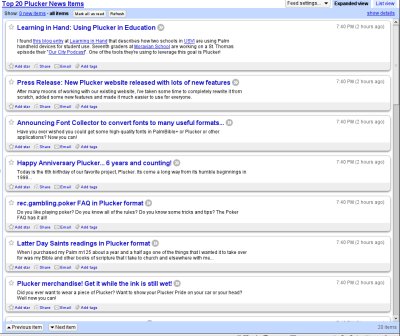
An enormous waste of space, IMHO.
But as luck would have it, someone else felt the same way about that problem and solved it with a Greasemonkey script.
As I fumbled through the rest of the interface, I began importing my feeds one-by-one from my Sage sidebar into the Google Reader sidebar. I got about 90% of the way through, grumbling that Google Reader needed an ‘Import’ feature, and realized that Google Reader has exactly that… buried in the Settings page. It would have even imported my Sage OPML file, if I knew that earlier.
Why they didn’t decide to make it an option right ON the sidebar where you create and manage feeds, I’ll never know.
So I’ve imported all of my feeds and manually created what Google Reader refers to as “Folders” to organize them so they look like my Sage feeds and structure. Google Reader actually supports drag-n-drop here between “Folders”, which is nice and makes it easy to organize LOTS of feeds.
So now onto the bugs I’ve found in the last 30 minutes or so of playing with it:
- No way to sort the feeds in the sidebar by name/date/etc. itself. You can sort the feed articles on the right side, but not the feeds themselves.
- Google Reader refers to “Folders” in one place (main page dropdown), but calls these same items “Tags” in another place (Settings page). Why not make it behave like Gmail, where you can “tag” feeds and set colors to each of them? At the very least, use the same terms in all of the relevant places.
- No way to remove/hide or “archive” read items from view on the right side panel. Huge oversight.
- I can’t seem to style or change the interface at all. Sage Styles are quite spiffy.
- Can’t “undock” the interface, like I can with Sage.
I’m sure there are other issues, but I’m still green with using it… I’ll repost more when I have a chance to really beat this up.
The only reason I’m exploring this particular tool, is to try to carve out more time and productivity using feeds.
What is going on with the price of gas?
 I drive by my local gas station every morning on the way to the train, and over the last 3 days I noticed a sharp rise in the price of gas:
Tuesday night: $3.43
Wednesday morning: $3.44
Wednesday night: $3.44
Thursday morning: $3.45
Thursday night: $3.64
Gas jumped $0.21 in a matter of 3 days, $0.19 of that in less than a day.
Why is the price of gas so high, and still rising?
The statistics show that production is up and demand is down (although China is booming, which has some impact).
4/17/2000 $1.63
4/16/2001 $1.75 (+06.86% from 2000)
4/15/2002 $1.59 (-09.15% from 2001)
4/14/2003 $1.79 (+11.18% from 2002)
4/19/2004 $1.99 (+10.06% from 2003)
4/18/2005 $2.43 (+18.11% from 2004)
4/17/2006 $2.99 (+18.73% from 2005)
4/16/2007 $3.08 (+02.93% from 2006)
4/14/2008 $3.61 (+14.69% from 2007)
(Source: Energy Information Administration).
I’d love it if someone could take this table, import it into a spreadsheet and do a per-country breakdown to see the trending of gas prices rising and falling.
We have more oil stockpiled than we need, and we’re not using it as fast as we used to, so why has the price of gas gone up 54.85% since 2000.

It makes no sense whatsoever. Gas prices go up sharply, but come down very slowly. We can’t sustain this market if the price of gas is going to keep increasing like this.
I found this neat gadget over on zFacts:
| Gasoline Prices |
And before the Canadians and Europeans jump on me for ranting about paying such a “cheap” price for gas, let me remind you that YOU have more-efficient vehicles, better EPA standards and your public transportation is FAR better than even our best in the US. Your roads also allow and encourage people to walk, cycle, rollerblade and so on.
Here in the US, in most cities and towns.. you’re not only discouraged from using bicycles/walking on the roads, it’s downright forbidden.
When I go to the stores now, I don’t even use plastic bags for most of my purchases. Plastic bags (and plastics in general) are made from petroleum, and petroleum comes from… you guessed it:
Oil.
It’s always about oil.